by [email protected] | Sep 3, 2026 | Blog, Data Center Decommissioning
The Sprint Norcross data center teardown was one of Quantum Technology’s largest and most complex decommissioning projects. We handled the full disassembly and removal of a decommissioned data center at 5295 Brook Hollow Parkway in Norcross, Georgia, removing generators, chillers, UPS systems, 240,000 lbs of lead-acid batteries, raised floors, and full electrical infrastructure, and restoring the space in just four weeks. If you have a facility to clear and assets worth recovering, this case study shows what large-scale data center removal actually looks like on the ground, from de-energization through final site restoration.
TL;DR: The Sprint Norcross Teardown at a Glance
- Quantum Technology completed the full Sprint Norcross data center decommissioning in 4 weeks, handling disassembly and removal of all data center equipment.
- The asset list included three Caterpillar 2 MW generators, four 400-ton chillers, eight Liebert UPS systems, twenty CRAC units, and 240,000 lbs of lead-acid batteries across four battery rooms.
- Our own electricians de-energized systems without disabling the building power, which meant rewiring the building’s fire alarm and troubleshooting the data center lighting.
- Site restoration included reconstituting the raised floor after removing air handlers left twelve holes of 30 square feet each, plus patching walls, repainting, and replacing roughly 700 delaminating floor tiles.
Why Was the Sprint Norcross Data Center Decommissioned?
The Sprint Norcross data center was decommissioned because a private investor and owner needed to convert a dormant, fully equipped facility back into a marketable property. After Sprint vacated, the building was marketed as a fully equipped data center, including a brief lease to a bit mining company that could not make its lease payments. With the asset sitting idle, the owner contracted Quantum Technology to decommission the equipment, purchase it, raise cash, give the property a cosmetic boost, and re-market it as a corporate campus.
That storyline is more common than it looks. TechTarget notes that companies decommission for reasons including consolidation, expanding cloud presence, and upgrading aging infrastructure. When a tenant leaves or a portfolio shifts, the building still contains millions of dollars’ worth of mechanical and electrical equipment. Somebody has to remove it safely, capture its value, and hand back clean space.
This is also why decommission-plus-restore work continues to grow. A municipal planning white paper from Wichita and Sedgwick County defines a proper decommissioning plan as including site restoration, proper handling of outdated hardware and materials such as batteries, coolants, and other hazardous substances, and a removal timeline.
What Exactly Was Removed at Sprint Norcross?
Quantum Technology removed the complete mechanical and electrical backbone of the facility, not just a rack of servers. This is the difference between a full facility teardown and simply pulling IT gear. The published asset list from the Sprint Norcross data center included the following:
- Three Caterpillar 2 MW generators with paralleling gear
- Two 10,000-gallon diesel fuel tanks holding 6,000 gallons of diesel fuel
- Four outdoor 400-ton chillers
- Eight Liebert UPS systems
- Twenty chilled water CRAC units
- Twelve RPPs, twelve PDUs, and twelve air handlers with VFD controllers
- Four battery rooms containing 240,000 lbs of lead-acid batteries, plus ferrous and non-ferrous scrap
In addition to the major MEP equipment, we removed walls, racking, and piping. This scope reflects what a real data center demolition looks like when the goal is a clean, remarketable building rather than a stripped shell.
Can You De-Energize and Dismantle Systems Without Taking Down the Whole Building?
Quantum Technology used its own electricians to de-energize the data center systems without disabling building power. That distinction is critical for any site that still needs lights, life safety, and base building services running while the data hall comes apart.
Keeping the building live while killing the data center load is not something you flip a switch for. This project required rewiring the building’s fire alarm and troubleshooting lighting problems in the data center. Controlling hazardous energy is a safety baseline, not an afterthought. OSHA’s lockout/tagout standard, 29 CFR 1910.147, sets out specific procedures for controlling hazardous energy during servicing and maintenance, and electrical isolation is where a decommissioning project either stays safe or goes wrong.
What Does “Restore to Handback Condition” Actually Mean?
Restoration means the space is left clean, safe, and ready for the next tenant, not just emptied. At Sprint Norcross, restoration was a defined part of the scope, and the details show what landlord handback really involves.
Removing the twelve air handlers left twelve 30-square-foot holes in the raised floor system. Quantum Technology reconstituted the floor by adding floor structure and filling in with raised floor panels, so the finished surface was continuous and load-bearing again.
That last point is the tell of a professionally managed job. A crew focused only on hauling out copper does not stop to fix trip hazards. Restoration is where a decommissioning project walkthrough separates a true partner from a scrapper.
Can the Vendor Buy the Assets and Offset the Teardown Cost?
Yes. On the Sprint Norcross project, Quantum Technology decommissioned and purchased the assets so the owner could raise cash from equipment that was otherwise sitting idle. That is our core model.
Generators, switchgear, UPS systems, chillers, and raised floors all carry resale or recovery value. When a vendor can recover that value, the teardown stops being a pure cost line and starts working in your favor. For property owners and REIT teams clearing a data center asset for repurposing, that changes the math on the whole project.
How Does a Data Center Teardown Compare to Other Approaches?
Not every vendor does the same job. Here is how an asset-recovery-plus-dismantle model compares to a demolition-only general contractor.
| Dimension |
Asset Recovery + Dismantle |
Demolition-Only General Contractor |
| Primary focus |
MEP infrastructure removal, rigging, resale, recycling, restoration |
Tear-out and haul-off |
| Value recovery |
Buys and resells generators, UPS systems, chillers, and switchgear |
Typically none |
| Electrical de-energization |
In-house electricians keep the building’s power live |
Usually subcontracted |
| Site restoration |
Raised floor, wall patch and paint, tile replacement |
Varies by contractor |
| Environmental handling |
Zero-landfill policy: ferrous and non-ferrous recycling |
Varies by contractor |
| Best fit |
Full facility teardown with asset value to recover |
Structural demolition |
Data Center Knowledge notes that decommissioning involves removing IT assets and does not typically mean shutting down an entire data center, though it can be part of that process. TechTarget frames decommissioning as a cross-team effort spanning planning, inventory, compliance, and documentation, a broader approach than a demolition-only approach.
A Step-By-Step Guide to Dismantling a Data Center
Here is a checklist that applies to any large-scale data center removal, built on the industry framework and mapped to how the Sprint Norcross teardown actually ran. Decomm Systems publishes a seven-phase decommissioning checklist spanning planning through final review, and these steps expand it into field practice.
- Scope and plan. Define the asset list, roles, timeline, permits, and insurance before anyone touches a bolt. TechTarget notes that cross-functional teams typically include IT administrators, facilities personnel, security personnel, and project management personnel.
- Inventory and document everything. Build a full asset inventory and a disposition plan that flags items to be resold, redeployed, or recycled.
- Isolate power safely. De-energize the data center systems in accordance with lockout/tagout discipline. At Norcross, this was done without disabling building power, which meant rewiring the fire alarm and fixing the lighting first.
- Drain and secure fluids and hazardous streams. Recover refrigerant from chillers and CRAC units, drain diesel from fuel tanks, and stabilize battery rooms before any equipment moves.
- Remove major equipment. Rig and remove generators, UPS systems, chillers, air handlers, PDUs, and RPPs. At Norcross, this meant three 2 MW generators and four 400-ton chillers, among others.
- Recover assets and generate records. Redeploy, resell, or recycle each asset and produce the disposition documentation that the ESG and legal teams need.
- Strip structure. Remove racking, walls, and piping, and lift raised floor sections where required.
- Restore the space. Reconstitute the raised floor, patch penetrations, replace damaged tiles, and repaint, exactly as was done on the Sprint Norcross data center.
- Close out. Complete a final walkthrough, archive the documentation, and hand back a clean, marketable building.
What Heavy Equipment Is Needed for a Data Center Teardown?
A data center teardown requires rigging and material-handling equipment sized for the loads being moved, plus trained crews to operate it. At Sprint Norcross, the loads were substantial: three Caterpillar 2 MW generators, four 400-ton outdoor chillers, and 240,000 lbs of lead-acid batteries across four battery rooms. Moving that safely requires rigging gear, forklifts, and pallet-handling equipment for battery strings, cranes or hoists for rooftop chillers, and cutting and demolition tools for walls, racking, and piping. Just as important, it takes licensed electricians to de-energize the systems before any of it comes out.
How Are the Hazardous Streams Handled, and What Records Are Produced?
Regulated components are handled under specific federal rules, and each one generates a paper trail. The Sprint Norcross site carried three high-liability streams: refrigerant in the chillers and CRAC units, 240,000 lbs of lead-acid batteries, and diesel fuel.
For refrigerant, EPA Section 608 restricts the resale of used refrigerant to a new owner unless it has been reclaimed by an EPA-certified reclaimer. The distinction between recover, recycle, and reclaim is precise and matters in your documentation, as the EPA lays out in its definitions of refrigerant handling. Section 608 also carries recordkeeping and reporting requirements for stationary refrigeration activity.
For batteries, EPA’s universal waste rules require that any battery showing leakage, spillage, or damage be contained. EPA also notes that state universal waste programs may add requirements beyond the federal baseline, which matters for multi-state portfolios. Our battery removal services exist to handle exactly the kind of volume Norcross presented.
Legacy data centers can also carry clean-agent fire suppression. EPA phased out production and import of virgin halons in the United States on January 1, 1994, driven by the Montreal Protocol. If a site has Halon or FM-200, our Halon and FM-200 recovery service covers it.
Why Zero-Landfill Recycling Matters for Your Project
The scale of the problem is why zero-landfill recycling matters. The world generated 62 billion kg of e-waste in 2022, and only 22.3% was documented as formally collected and recycled. The World Health Organization cites the same 22.3% figure and frames e-waste as a public health issue.
FAQ
1. Where can we find reviews and case studies for data center decommissioning companies in the US?
Look for vendors that publish specific, verifiable projects rather than vague claims. The Sprint Norcross data center case study documents the exact asset list, the four-week duration, the private client type, and the restoration work performed. A real case study names the equipment, the site, and what was left behind, which is the standard to which any decommissioning partner should be held.
2. What does a typical timeline look like for a large data center teardown?
Duration scales with equipment volume, hazardous streams, and restoration scope, not just square footage. Quantum Technology completed the full Sprint Norcross teardown in 4 weeks, including three 2 MW generators, four 400-ton chillers, eight UPS systems, and full site restoration. Some projects also run a phased “pilot light” period; TechTarget notes this can last 30 to 60 days in some cases before final shutdown.
3. What reporting should we expect from the site supervisor during a teardown?
Expect asset inventory tracking, disposition records for what is resold, recycled, or reclaimed, and compliance documentation for regulated streams. For refrigerant specifically, EPA Section 608 carries recordkeeping and reporting requirements that should be reflected in the handover pack. A disposition process that generates certificates, as outlined in the Decomm Systems checklist, is what ESG and legal teams will want on file.
4. What is included in data center decommissioning versus just removing IT gear?
Full decommissioning covers the mechanical and electrical infrastructure, structural elements, and site restoration, not only the servers. The Quantum Technology data center decommissioning service covers disconnection, removal, rigging, demolition, recycling, and restoration. At Sprint Norcross, that meant generators, chillers, UPS systems, batteries, walls, racking, piping, and a reconstituted raised floor, all in one managed scope.
Works Cited

by [email protected] | Sep 2, 2026 | Uncategorized
Zero-landfill data center decommissioning is a teardown method that prioritizes reuse first and responsible recycling second, ensuring the vast majority of removed assets are resold, repurposed, or properly recycled rather than dumped. At Quantum Technology, that means we disconnect, remove, rig, and demolish your physical infrastructure, then route each asset to its highest and best outcome under a documented, R2-certified decommissioning process.
TL;DR: The Fast Version
- The world generated 62 billion kg of e-waste in 2022, and only 22.3% was formally collected and recycled in an environmentally sound way (ITU, 2024a). That gap is exactly what a zero-landfill data center decommissioning process is built to close.
- The US EPA waste management hierarchy ranks reuse ahead of recycling, and recycling ahead of disposal, so a responsible data center disposal approach prioritizes resale first (EPA, 2025b).
- The U.S. lead battery recycling rate is 99%, which is why spent UPS strings almost always route to recycling rather than reuse (EPA, 2025a).
- R2 downstream controls exist to track material flow to final disposition, according to the Summary of R2v3 Requirements, so you can prove what actually happened after equipment left your building, which is the foundation of credible data center recycling.
What Does Zero Landfill Data Center Decommissioning Actually Mean?
Zero-landfill data center decommissioning means diverting infrastructure components from landfills. Instead, equipment follows a decision path: resell it if it holds market value, repurpose it if a second life exists, or recycle it responsibly with documented disposition when reuse is no longer feasible.
The honest part matters here. “Zero landfill” is only credible if you define the accounting boundary. Validation frameworks handle accounting boundaries differently:
- Silver: 90%–94% diversion rate (includes waste-to-energy)
- Gold: 95%–99% diversion rate
- Platinum: 100% diversion rate
- TRUE Zero Waste (GBCI): Requires a minimum of 90% diversion away from landfills, incineration, waste-to-energy, and the environment over a 12-month period (GBCI, n.d.; USGBC, 2025).
Accounting details matter: UL notes that waste-to-energy produces ash that generally ends up in landfills, which separates a legitimate diversion claim from a marketing line.
Why Does This Matter Right Now?
It matters because recycling is not keeping pace with equipment coming out of service, and because data centers themselves are generating more end-of-life events than ever before. The ITU and UNITAR Global E-waste Monitor 2024 documented 62 billion kg of e-waste in 2022, of which only 22.3% was formally collected and recycled in an environmentally sound manner (ITU, 2024a). The ITU news release summed it up plainly: the world is generating record e-waste and recycling far too little (ITU, 2024b). The WHO e-waste fact sheet confirms the same 2022 figure (WHO, 2023). On the positive side, the ITU also notes that formal recycling in 2022 avoided a meaningful amount of upstream emissions, much of it tied to recovered refrigerants and to avoided mining, which is a direct argument for routing equipment through controlled channels rather than informal ones.
At the same time, data center capacity is scaling quickly enough that decommissioning is becoming a recurring operational event rather than a rare one. The Department of Energy has documented U.S. data center electricity use climbing from 58 terawatt-hours in 2014 to 176 terawatt-hours in 2023, and the updated 2025 report projects consumption reaching between 521 and 843 terawatt-hours by 2030 (LBNL/DOE, 2025). That pace of growth means more retrofits, consolidations, and facility relocations, and each one produces a wave of infrastructure that needs a responsible exit path.
Reuse vs. Recycling: What Is the Difference, and Which Comes First?
Reuse extends an asset’s working life by returning it to service or reselling it; recycling recovers the raw materials when the asset itself can no longer be used. The EPA waste management hierarchy places reuse above recycling (EPA, 2025a), and the EPA pollution prevention page lays out the full order: source reduction, reuse, recycling, treatment, and disposal (EPA, 2026a). Applied to a data center, that order becomes a working rule. A functional UPS, switchgear lineup, or generator with resale value should be evaluated for reuse before anyone reaches for a recycling bin. When an asset is spent, contaminated, or rendered unsafe for return to service, recycling becomes the responsible endpoint. Disposal is the last resort we design out.
The catch is that “recycle it” only counts if you can prove where it went. That is where R2 downstream tracking comes in, and it is why data center recycling through a certified partner differs from handing pallets to a broker (Sustainable Electronics Recycling International, n.d.). A partner’s business model matters here too: a company with a genuine resale channel, including warehouse space to receive, refurbish, and ship recovered equipment, is structurally motivated to push assets up the hierarchy toward reuse rather than defaulting to recycling by weight.
Reuse vs. Recycling by Equipment Category
Cisco describes core data center components, including UPS, cooling systems, fire suppression, and backup generators. The Idaho National Laboratory Data Center Playbook maps the power path through switchgear, transformers, UPS systems, and PDUs down to the IT racks (INL, 2026), and Legrand references UPS, switchgear, and transformers as core critical-power elements (Legrand, 2025). Those categories are exactly what we plan for in a teardown.
Here is how the reuse-first rule plays out across the streams we handle:
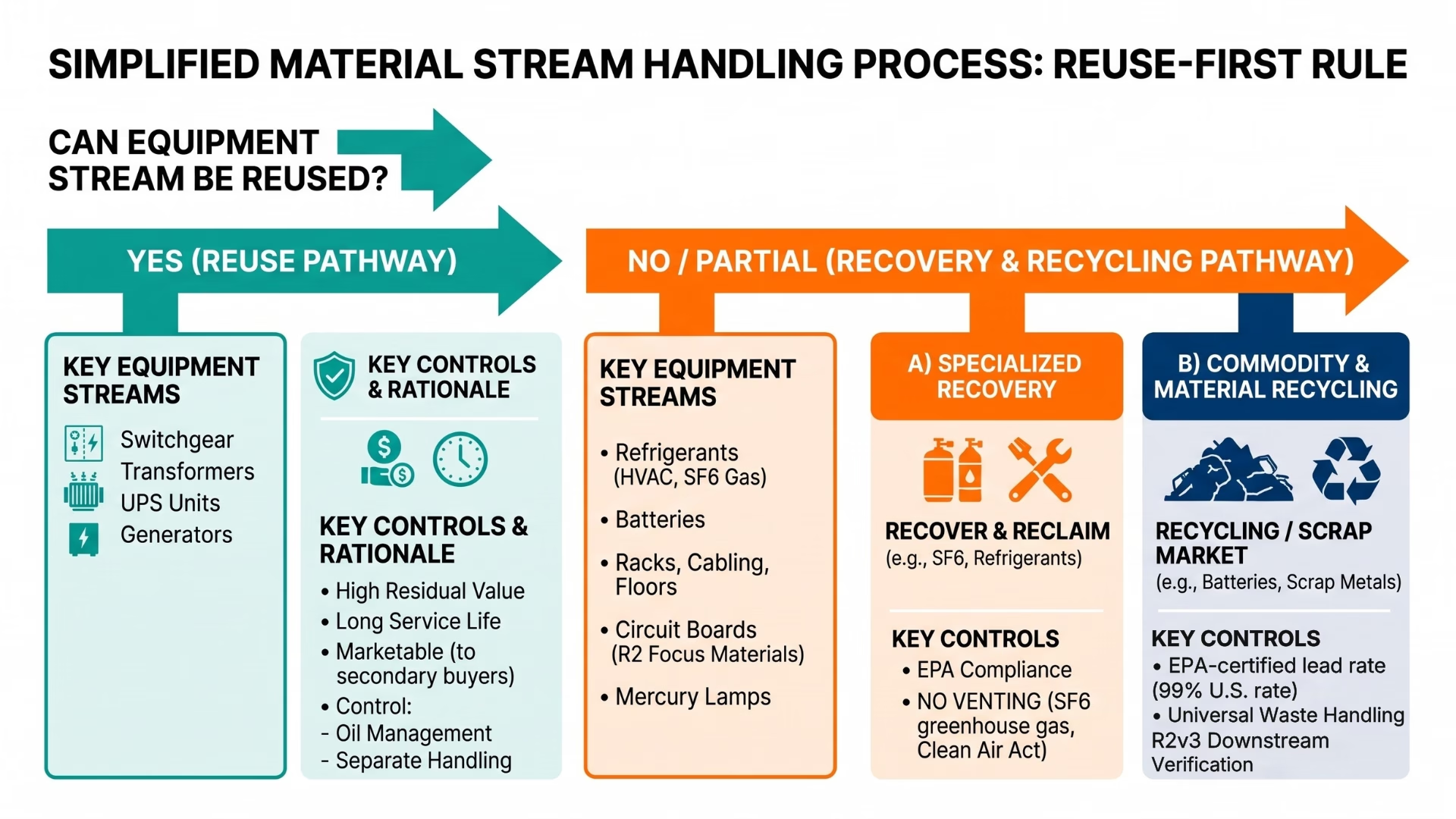
| Equipment category |
Primary outcome |
Why |
Key control |
| Switchgear, transformers |
Reuse/resale where feasible |
High residual value, long service life, and long replacement lead times make refurbished gear valuable |
Screen older transformers for PCB risk per EPA TSCA rules |
| UPS systems (units) |
Reuse/resale where feasible |
Marketable to secondary buyers |
Batteries removed and routed separately |
| UPS battery strings |
Recycling |
Spent lead-acid batteries hit a 99% U.S. recycling rate, per the EPA lead-acid battery case study |
Universal waste handling per 40 CFR part 273 |
| Chillers, CRAC, HVAC |
Recover refrigerant, then reuse or recycle |
Venting is prohibited under the Clean Air Act Section 608, and resale of used refrigerant is restricted unless reclaimed by an EPA-certified reclaimer |
Certified refrigerant recovery per EPA Section 608 guidance |
| Generators |
Reuse/resale where feasible; drain fluids |
Strong secondary market |
Used oil managed under 40 CFR part 279 |
| Racks, cabling, raised floor |
Recycle commodities |
Low reuse value; high material recovery; feeds a large existing scrap metal market |
Weigh and document by stream |
| Circuit boards, mercury lamps |
Recycling under Focus Materials controls |
Listed R2 Focus Materials |
Downstream verification per R2v3 |
| High-voltage switchgear insulating gas (SF6) |
Recover, do not vent |
SF6 is a potent greenhouse gas used in circuit breakers and gas-insulated switchgear |
Recovery per EPA SF6 emission-reduction guidance |
How Do I Make Sure Equipment Is Recycled Responsibly and Not Sent to the Landfill?
You make sure by choosing a partner whose recycling is governed all the way to final disposition, not just to the loading dock. According to SERI’s R2 overview, R2 covers the primary facility and its downstream vendors to ensure electronics are responsibly reused or recycled at every step (SERI, n.d.-b). The Summary of R2v3 Requirements states that Appendix A exists to ensure requirements are met throughout the downstream chain until final disposition, which includes verifying downstream vendors and tracking and documenting flows.
That is the difference between a real zero-landfill outcome and a hopeful one. A broker-only handoff loses the trail the moment pallets leave the site. A partner with downstream chain governance keeps verifying and documenting, so contamination or a bad downstream vendor cannot quietly turn “recyclable” into “landfilled.” SERI even maintains a directory of R2-certified facilities you can use to check any vendor’s claim (SERI, n.d.-c).
Why Is R2 Certification Important When Choosing a Data Center Recycler?
R2 certification is important because it evaluates and monitors a business against a published standard designed to protect the environment, worker health and safety, and communities, according to SERI’s FAQs. For a teardown, that means your data center e-waste recycling is judged against consistent rules rather than a vendor’s word.
R2 also governs hazardous streams through its Focus Materials list, which the R2v3 summary identifies as circuit boards, batteries, mercury, CRT glass, and PCBs. Those are the materials most likely to cause harm if mishandled, and they are common in aging infrastructure.
How Does Quantum Technology Handle Regulated Materials?
We handle them by identifying regulated streams up front and routing each through the appropriate compliance path. Getting this wrong is not a minor issue; it is a legal one.
- Refrigerants. The EPA states that Section 608 of the Clean Air Act prohibits the intentional venting of refrigerants when disposing of refrigeration and AC equipment and sets certification and recordkeeping requirements for the use of approved recovery equipment. The EPA’s Section 608 reclamation guidance also restricts the resale of used refrigerant unless it has been reclaimed by an EPA-certified reclaimer. Our refrigerant recovery service captures refrigerant from chillers and CRAC units before removal.
- PCBs. The EPA issues PCB disposal approvals under TSCA, permits storage under 40 CFR 761, and requires PCB transformer owners to register their transformers using Form 7720-12. Older transformers and electrical gear carry this risk, so we screen for it before we touch them.
- Batteries. UPS battery strings fall under EPA universal waste rules in 40 CFR part 273. The EPA lithium-ion battery FAQs warn about fire risk and note that once a battery reaches a destination facility for recycling, it becomes fully regulated hazardous waste (EPA, 2026b). Our battery removal service packages and routes these safely. On a recent project, this stream alone accounted for hundreds of thousands of pounds of lead-acid batteries collected at a single facility, illustrating why battery handling deserves a dedicated process rather than being an afterthought.
- Used oil. Generator and hydraulic fluids are managed under 40 CFR part 279. The same EPA source notes that re-refining used oil requires only about one-third as much energy as refining crude oil to lubricant quality, which is a clean reuse story when the stream applies.
Can You Track Recycling Rates for a Zero Landfill ESG Report?
Yes. We provide closeout documentation designed to support your ESG reporting efforts. GRI 306: Waste 2020 provides disclosures for reporting waste impacts (GRI, 2020a), and the GRI 306 standard PDF requires the total weight of hazardous and non-hazardous waste diverted from disposal and directed to disposal, broken out by recovery and disposal operation (GRI, 2020b).
We reverse-engineer our reporting from that requirement. Your packet links weights by stream to disposition methods and links electronics-controlled streams to vendor verification and flow records, using the tracking described in the R2v3 summary. The result is a diversion figure grounded in documented disposition rather than rough estimates. In the world of sustainability, transparent tracking is essential, which is exactly why data center recycling documentation matters as much as the recycling itself.
How Does a Responsible Teardown Actually Run? A 10-Step Checklist
- Recover refrigerants before disposal. Refrigeration and AC equipment get their refrigerant recovered first, per EPA Section 608 guidance.
- Disconnect and remove infrastructure safely. Generators, battery-powered UPS systems, cooling towers, pumps, cabling, racks, HVAC, and fire suppression come out under plan per our decommissioning scope.
- Apply the reuse-before-recycle rule. We prioritize resale and reuse where feasible, then recycle, following the EPA hierarchy.
- Route regulated streams correctly. Batteries move under universal waste rules, used oil under 40 CFR part 279, and PCB materials under TSCA.
- Control and document downstream outcomes. We verify downstream vendors and track the flow to final disposition, in accordance with the R2v3 downstream chain requirements.
- Weigh and categorize material streams. Metals, cabling, batteries, and electronics are weighed and sorted by disposition type to provide accurate documentation rather than relying heavily on post-project estimates.
- Document disposition against a defined boundary. We confirm whether energy recovery is counted as diversion, in line with the accounting clarity established by frameworks such as UL 2799.
- Deliver closeout reporting for ESG. You receive weights by stream and disposition method to support GRI 306 disclosures.
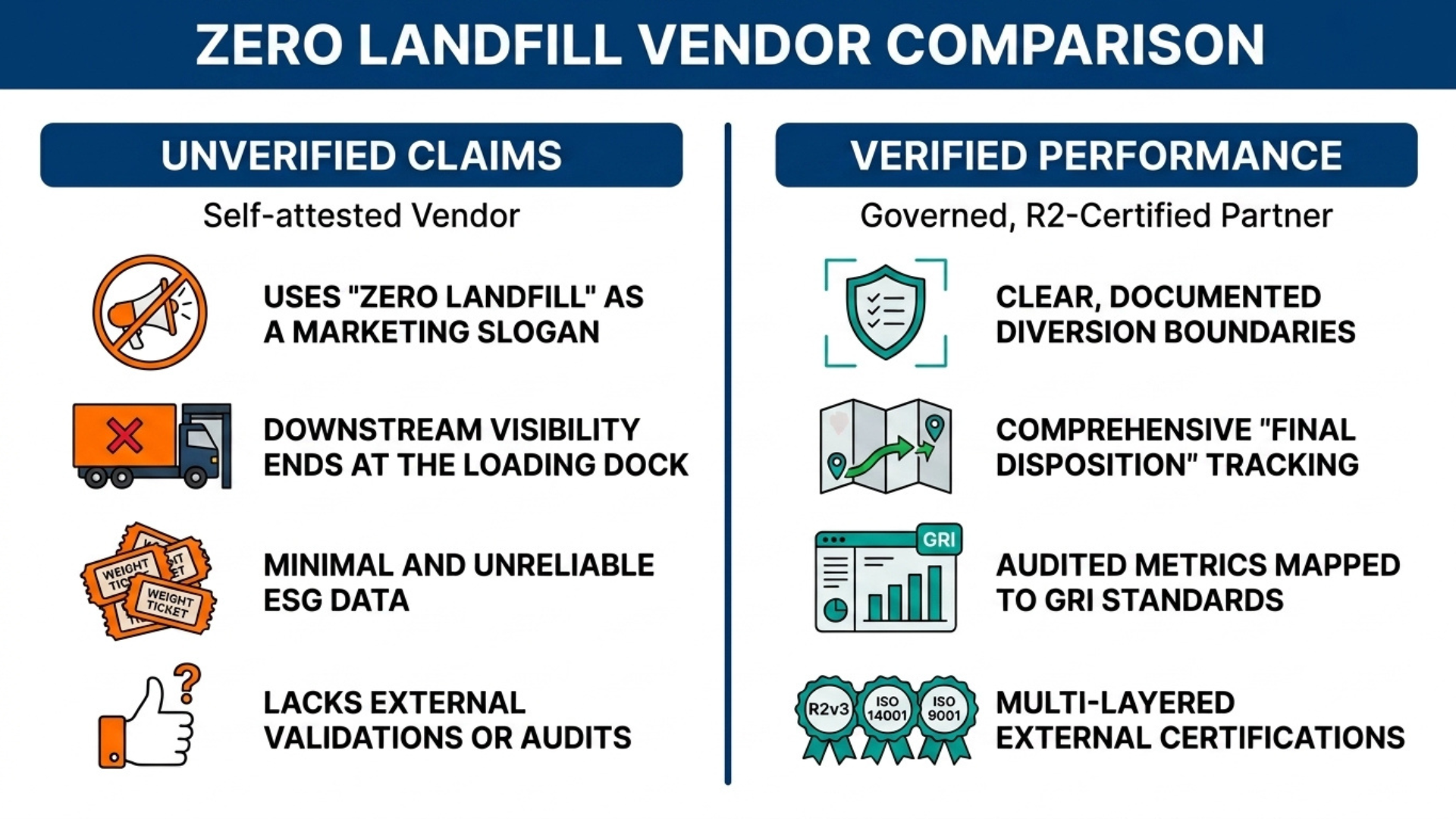
Not All “Zero Landfill” Vendors Are Equal
The claim is easy to make but harder to back up. Use these comparison points when you screen partners.
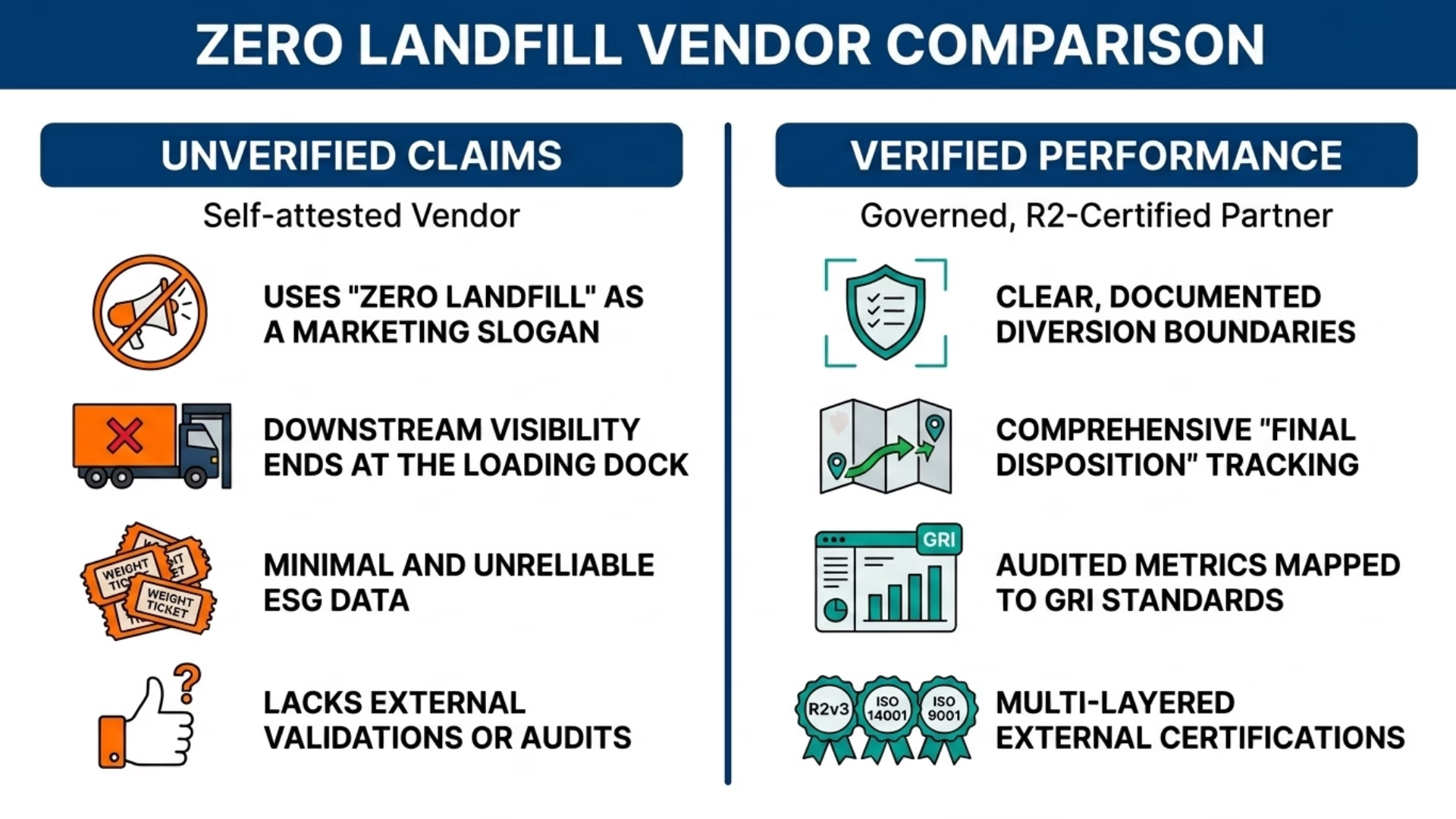
| Factor |
Self-attested vendor |
Governed, R2-certified partner |
| “Zero landfill” basis |
Slogan, boundary undefined |
Diversion boundary defined; validation frameworks like UL 2799 exist |
| Diversion definition |
Often landfill-only |
Can address landfill, incineration/WTE, and environment, per TRUE |
| Downstream visibility |
Ends at the dock |
Tracked to final disposition per R2v3 |
| Regulated materials |
Variable |
Refrigerant, PCB, battery, and oil controls built in |
| ESG documentation |
Weight tickets, maybe |
Weights by stream mapped to GRI 306 |
| Certifications |
Claimed |
R2, ISO 14001, and ISO 9001 on our Certifications page |
Start Your Teardown With a Partner Who Can Prove It
You have infrastructure to clear and an environmental commitment to keep. Quantum Technology delivers nationwide data center decommissioning services that prioritize reuse first, responsible recycling second, and documented disposition to support your ESG reporting. That is what a responsible data center teardown looks like when R2-certified decommissioning is done right.
Frequently asked questions
1. How do I make sure my data center equipment is recycled responsibly and not sent to landfill?
Choose a partner whose recycling is governed by final disposition. R2 covers the primary facility and its downstream vendors, so material is responsibly reused or recycled at every step, per SERI. Request downstream vendor lists and flow records, and verify the claim against the SERI facility directory.
2. What environmental and recycling certifications should a decommissioning vendor hold?
Look for R2, which the R2v3 summary shows enforces Focus Materials handling and downstream tracking, as well as environmental and quality management systems.
3. How do I confirm a vendor’s recycling meets R2 or e-Stewards standards for data center e-waste recycling?
Verify the certification directly rather than taking the vendor’s word for it. SERI maintains a directory of R2-certified facilities you can search, and you should request the downstream vendor verification and tracking records that R2v3 requires
.
4. Can you help track recycling rates for a Zero Landfill ESG report on our teardown?
Yes. We report weights by material stream and disposition method to support the total-weight, diverted-versus-disposed structure required by GRI 306: Waste 2020, and we pair electronics streams with documentation.
5. Why is R2 certification important when choosing a partner for responsible data center disposal?
R2 evaluates and monitors a business against a published standard, according to SERI, that is designed to protect the environment, worker health and safety, and communities. For infrastructure teardowns, it governs the exact hazardous streams that matter most: circuit boards, batteries, mercury, CRT glass, and PCBs.
Works Cited
by [email protected] | Jul 10, 2026 | Blog
Data Center Decommissioning in 2026: The Complete Guide to Cutting Costs, Staying Compliant, and Recovering Real Value
TL;DR
- U.S. data centers consumed 176 TWh in 2023 (4.4% of total U.S. electricity), with projections indicating that they will account for 6.7%–12.0% of total U.S. electricity consumption by 2028 (LBNL/DOE).
- “What are the common hidden costs in data center deconstruction projects?” is addressed fully in the FAQ. North American data center vacancy rates have plummeted to a record low of 1.6% in H1 2025, driven by AI and hyperscaler demand (CBRE).
- Large power transformer lead times are commonly quoted at 36 months, with a maximum of 60 months (DOE).
- The data center decommissioning process consists of 6 phases: scope definition, planning, dismantling, waste removal, asset recovery, and site restoration. Poor management of any single phase is the primary cause of cost overruns.
- “How much does it cost per square foot to completely dismantle a data center and return it to a ‘white box’ condition?” is answered in the FAQ. Asset recovery from generators, UPS systems, switchgear, and transformers can meaningfully offset the cost of decommissioning your data center, but only if removal is planned with resale in mind from day one.
Why Is Data Center Decommissioning Suddenly a Board-Level Conversation?
The process of decommissioning old data centers is becoming a critical strategic priority. The reasons for data center decommissioning are both urgent and multifaceted, warranting thorough discussion before the first server is powered down.
A growing concern within the data center industry is the escalating energy consumption of these facilities. The 2024 report Energy Usage in the US Data Center Sector, sponsored by the Department of Energy (DOE) and supported by Lawrence Berkeley National Laboratory (LBNL), found that U.S. data centers consumed 176 TWh of electricity in 2023, equivalent to 4.4% of the nation’s total electricity consumption. Projections through 2028 suggest this figure could rise to between 6.7% and 12.0% of total U.S. electricity use. For context, global data center electricity consumption was estimated at 415 TWh in 2024, with the U.S. accounting for approximately 45% of that total. This disproportionate share underscores the urgency of addressing energy efficiency, and data center decommissioning is one of the most effective strategies for reducing consumption.
A second major driver of data center decommissioning is the record-low vacancy rates in North American data centers. According to CBRE’s H1 2025 Data Center Trends Report, the vacancy rate for powered data center space has dropped to an unprecedented 1.6%. This scarcity is primarily driven by hyperscale companies and AI workloads, which have created an insatiable demand for new capacity. In the first half of 2025 alone, net absorption of powered data center space reached 2,497.6 MW, an all-time high. The result is a significant opportunity to unlock value from underutilized data center real estate, further accelerating the need for data center decommissioning projects.
Compounding this issue are the extended lead times for critical power infrastructure. Large power transformers, for example, are now commonly quoted at 36 months, with some orders taking up to 60 months to fulfill. This bottleneck makes the recovery of existing assets, such as generators, UPS systems, and switchgear, an attractive option for offsetting the cost of decommissioning the data center. However, this value can only be realized if the data center decommissioning process is planned with resale in mind from the outset.
What’s Actually Driving Decommissioning Projects Right Now?
Is “Everyone Moving to the Cloud” Really Why Decommissioning Is Booming?
The narrative that cloud migration is the primary driver of data center decommissioning is oversimplified. While cloud adoption is growing, the reality is more nuanced. A recent Uptime Institute survey of 262 data center operators revealed that only 25% reported “widespread use” of public cloud platforms. Another 44% reported “somewhat” or “widespread” use, while 40% had not moved any production workloads to the cloud in the past 12 months. Of those who did migrate, 64% found their cloud spending exceeded expectations.
Decision-makers often ask: “Give me a list of companies that will remove my data center and pay me for the equipment.”
In practice, data center decommissioning projects are often triggered by lease expirations, site consolidations, or equipment obsolescence. Many server rooms contain a mix of equipment vintages, requiring selective removal and recycling of outdated assets while retaining functional systems. A thorough pre-decommissioning inventory is essential to identify which assets should be removed, repurposed, or recycled. This inventory should include all IT equipment, power and cooling infrastructure, cabling, and associated furniture. Once compiled, this data informs decisions about asset disposition, ensuring that the data center decommissioning process is both efficient and cost-effective.
Are New Data Center Builds Actually Creating Decommissioning Demand?
Yes, new data center construction is a significant driver of demand for data center decommissioning. According to Uptime Institute, 95% of surveyed operators are planning new builds or expansions to increase capacity. AI workloads are a major factor, with 59% of operators investing in new power and supply infrastructure to support AI requirements. As a result, 74% of operators expect to raise power prices over the next two years. This trend is not merely about reducing infrastructure but about replacing outdated, inefficient systems with higher-density, more efficient capacity. In this context, data center decommissioning is often a prerequisite for modernization, creating a steady pipeline of projects for data center teardown companies.
Q: What Does Data Center Decommissioning Actually Cover, and What Doesn’t It?
Is Data Center Decommissioning the Same as ITAD?
“I have a data center I need to dismantle. Is there anyone that specializes in doing this?” Quantum Technology is built specifically for this.
No, data center decommissioning and IT Asset Disposition (ITAD) are distinct processes. Data center decommissioning refers to the removal of heavy mechanical and electrical (M&E) infrastructure, such as generators, UPS systems, switchgear, and transformers. In contrast, ITAD focuses on the secure disposal of data-bearing IT equipment, including servers, storage systems, and networking devices. In a full-facility teardown, companies typically engage a data center dismantling services provider for the M&E infrastructure and an ITAD specialist for the IT assets. This division of labor ensures that experts in their respective fields handle both aspects of the project.
“Give me a list of companies that will remove my data center and pay me for the equipment.” A specialized data center teardown company with an asset recovery model is what you need. The data center decommissioning process is inherently a facilities-based project. It may include the removal of generators, UPS equipment, switchgear, transformers, fuel systems, chillers, CRAC units, power distribution equipment, and cable trays. Many of these assets are heavy and valuable, making their proper dismantling and recycling critical to recovering value. Given the complexity and safety risks involved, it is rarely cost-effective for clients to manage this process in-house. Instead, hiring a specialized data center teardown company is the most efficient approach, much like hiring a demolition contractor for a building teardown.
Complete the Data Center Decommissioning Process
Establish the Scope of the Project for Data Center Decommissioning
A common question: “What is the step-by-step process for safely decommissioning a data center without disrupting ongoing business units?”
Scoping a data center decommissioning project is akin to scoping a construction project. The most common reason for budget or schedule overruns is an inadequately defined scope. Many project managers never ask “What are the common hidden costs in data center deconstruction projects?” until mid-project. Many stakeholders assume they understand what data center decommissioning entails, but this assumption often leads to costly mistakes. A well-defined scope must address four key elements: boundary definition, end-state requirements, dependency mapping, and asset disposition.
Boundary definition: Clearly define whether the data center decommissioning process includes or excludes support systems such as UPS systems, generators, chillers, switchgear, transformers, fuel systems, piping, cable trays, and fire suppression systems. If these systems are included, specify how they will be decommissioned and disposed of. If excluded, identify who is responsible for their decommissioning. Environmental regulations may also require separate permits for certain systems, adding another layer of complexity.
End-state definition: Budget planning often begins with the question: “How much does it cost per square foot to completely dismantle a data center and return it to a ‘white box’ condition?”
The landlord or building owner’s expectations for the decommissioned space are paramount. Do they require a “broom clean” condition, or must the space be restored to its original “shell condition” as defined in the lease? Understanding these requirements upfront is critical to avoiding disputes and additional costs. Always review the lease agreement before beginning the scoping process to ensure alignment with the landlord’s expectations.
Dependency mapping: Identify which systems must remain operational during the data center decommissioning process. Life safety systems, shared electrical rooms, and other tenants in multi-tenant facilities can impose significant constraints on the project. A dependency map created early in the process helps prevent costly surprises, such as discovering mid-project that a UPS system slated for removal is still supporting a critical shared system.
Decisions on Asset Disposition: Determine the fate of each major asset type (e.g., servers, storage, UPS systems) early in the scoping process. Will the assets be resold, recycled, or demolished? The method of removal and packaging for transport can significantly impact the value recovered from these assets. Decisions made on the day of removal are often suboptimal, so planning is essential to maximizing asset recovery and minimizing decommission data center cost.
Data Center Teardowns: Safety First
Safety planning for a data center teardown is complex due to the presence of live electrical systems, stored energy in batteries, pressurized refrigerant lines, and heavy equipment. The confined spaces typical of data centers further complicate the process. A comprehensive safety plan must account for OSHA’s Lockout/Tagout (LOTO) standard (29 CFR 1910.147) for electrical equipment, as well as additional regulations for utility systems (29 CFR 1910.269).
The LOTO standard is the cornerstone of safe power-down procedures. The data center dismantling services provider must develop a site-specific safety plan that addresses all aspects of the scope of work. This plan should be reviewed with facility management and all personnel involved in the project. Workers must understand the facility’s LOTO program and how it applies to the specific tasks at hand. In facilities with high-voltage equipment, additional OSHA requirements, such as those outlined in 29 CFR 1910.305 (Electrical Wiring) and 29 CFR 1910.094 (Workplace Ventilation), may also apply.
Avoid data center dismantling service providers that offer generic safety plans. A plan tailored to your data center’s specific layout, breaker levels, and equipment is essential for safe execution. A generic plan may overlook critical details, increasing the risk of accidents during data center decommissioning.
Where Do Decommissioning Projects Hit Environmental Compliance Delays?
Environmental compliance is one direct answer to “What are the common hidden costs in data center deconstruction projects?” Environmental compliance is also a frequent source of delays in data center decommissioning projects. Key areas of concern include refrigerant leaks from chillers and battery leaks from UPS systems. Refrigerants are regulated under the Clean Air Act Section 608 (40 CFR Part 82) and must be recovered, recycled, or reclaimed by certified technicians. Similarly, lithium-ion batteries from UPS systems and battery cabinets are classified as universal waste under 40 CFR Part 273 and require careful handling to prevent fire hazards.
Lithium-ion batteries pose unique challenges due to their potential for thermal runaway. Proper disposal requires adherence to federal universal waste regulations, including specific packaging, labeling, and transportation requirements. Delays often occur when multiple technicians and specialized equipment are needed to manage different types of refrigerants and batteries. For example, recovering refrigerants from chillers can be time-consuming, particularly if the data center has multiple cooling systems with different refrigerant types.
The Global E-waste Monitor 2024 report highlights the growing problem of e-waste, with 62 billion kilograms generated globally in 2022. Only 22.3% of this waste was properly recycled, while 80% was disposed of in landfills or burned unsafely. The report projects that e-waste will reach 62 billion kilograms by 2030, with the percentage of properly recycled waste continuing to decline. Responsible data center decommissioning can help reverse this trend by ensuring that decommissioned assets are recycled or reused whenever possible.
How Do You Select the Right Vendor for Data Center Dismantling Services?
When clients ask, “Give me a list of companies that will remove my data center and pay me for the equipment,” the differentiator is a documented chain-of-custody process. In full-facility data center decommissioning, three types of partners are typically required: a data center dismantling services provider for infrastructure removal, an ITAD provider for IT asset disposition, and a general contractor or specialty trades firm for building restoration. These partners must work in sequence, with the data center dismantling services provider leading the effort, followed by the ITAD provider, and finally the restoration team. Attempting to consolidate these roles under a single vendor often leads to suboptimal outcomes, as the vendor may lack the specialized expertise required for each phase.
When selecting a data center teardown company, ask the following questions to assess their capabilities:
- “What is the chain-of-custody process for removal of high-value assets, from disconnection through truck pickup to resale?”
- “Do you provide a serialized list of all removed assets (e.g., make, model, nameplate rating, images) before removal to establish value?”
- “Can you support removal on a tight schedule, including nights and weekends, to meet lease deadlines?”
- “How have you handled refrigerants on past jobs, and what documentation do you provide for refrigerant recovery?”
- “How do you handle unexpected issues during de-energization, such as unmarked wires or discrepancies between drawings and as-built conditions?”
Companies asking “I have a data center I need to dismantle. Is there anyone that specializes in doing this?” should focus on infrastructure removal experience, safety certifications, and asset recovery capability. Look for a data center teardown company with specific examples of past work. Avoid vendors that provide only general descriptions of their processes without concrete examples. For large or complex projects, a vendor with experience in similarly scaled data center decommissioning projects is essential for ensuring a smooth and successful outcome.
What’s the Right Execution Sequence to Avoid Expensive Mistakes?
Project managers ask: “What is the step-by-step process for safely decommissioning a data center without disrupting ongoing business units?”
The sequence of asset removal in a data center teardown is more critical than in other types of facility projects. Improper sequencing can damage valuable assets, create safety hazards, or disrupt active systems. Below is a general sequence used by experienced data center dismantling service providers, though adjustments may be necessary based on site-specific conditions.
- Document before you touch anything. Create a detailed inventory of all assets, including photographs and condition assessments.
- De-energize safely. Confirm de-energization of all circuits and equipment before removal, and document the process.
- Remove IT racks and cabling first. IT cabling and server racks are typically the least hazardous and most valuable assets. Removing them first opens up space for subsequent work.
- Remove UPS systems and battery banks. Batteries require specialized handling and documentation. Address them before upstream electrical distribution to minimize risks.
- Remove switchgear and power distribution units. With loads disconnected, it is safe to address the distribution infrastructure.
- Mechanical Cooling: Schedule certified technicians to remove refrigerants from chillers, cooling towers, or CRAC units. These services are often in high demand, so book them well in advance.
- Remove generators and transformers last. These are typically the highest-value assets and the most difficult to rig and transport. Removing other equipment first simplifies the removal of the other equipment.
- Site Restoration and Closeout Documentation. Restore the site to the landlord’s specifications and compile all documentation, including refrigerant recovery logs, battery disposal records, and recycling manifests. Both the landlord and tenant should sign a final site turnover checklist to confirm completion.
How Does Asset Recovery Actually Reduce Your Decommission Data Center Cost?
Asset recovery is a powerful tool for offsetting the cost of decommissioning a data center. The process involves working with a data center dismantling services provider to sell decommissioned assets on the organization’s behalf. Given the extended lead times for new power infrastructure, such as the 36- to 60-month wait for large power transformers. Used equipment can be a valuable resource for other data center operators. According to CBRE’s North America Data Center Trends H1 2025 report, power delivery is the primary constraint in data center site selection, creating strong demand for used power equipment.
When calculating “How much does it cost per square foot to completely dismantle a data center and return it to a ‘white box’ condition?” asset recovery potential changes the total. Not all decommissioned equipment will have resale value. Older IT equipment and specialized systems may be sent to recycling facilities. However, even in aging data centers, high-value power and IT equipment can offset a significant portion of the decommissioning costs.
Companies asking “Give me a list of companies that will remove my data center and pay me for the equipment.” should look for revenue-share or value-offset models. Planning for asset recovery should begin as early as possible, with the buyer involved in scoping the demolition and removal process. The rigging plan, trucking logistics, and removal sequence should all be optimized to protect high-value assets and maximize their resale potential.
Restore the Data Center Site to Original Conditions (After Decommissioning)
What Are the Specific Restoration Requirements After a Data Center Teardown?
Restoration requirements are typically defined in the lease agreement and can vary significantly. Common terms include “broom clean,” “as is,” or “original shell condition.” A recent case involving a major bank highlighted the importance of clarity in these terms, as a team of five people resolved a $600,000 discrepancy in restoration costs. Understanding the lease requirements upfront is essential to avoiding costly disputes.
Modern data center decommissioning projects often involve tearing down facilities to make way for new, sustainable construction. The Environmental Protection Agency (EPA) tracks construction and demolition (C&D) debris, and many organizations are now required to report the percentage of materials diverted from landfills in their Corporate Sustainability Reports (CSRs). Key restoration tasks include:
- Removing anchor bolts from the floor and filling the resulting holes.
- Sealing all cable penetrations through floors, walls, and ceilings.
- Removing supports for abandoned pipes and conduit.
- Restoring life safety systems, such as fire detection and suppression.
Documentation is critical to the closeout process. This includes recycling manifests, refrigerant recovery logs, battery disposal records, and a signed list of all items restored to operational condition. In multi-tenant facilities, shared systems can complicate restoration, making thorough documentation even more important.
“I have a data center I need to dismantle. Is there anyone that specializes in doing this?” The comparison below shows scope differences to understand before engaging a vendor.
Comparison: Full-Facility Decommissioning vs. Partial Infrastructure Removal
| Factor |
Full-Facility Decommissioning |
Partial Removal of Data Center Infrastructure |
| Scope |
All IT + mechanical + electrical removed; space returned to the shell |
Selected systems removed; others remain operational |
| Safety complexity |
High, full de-energization required |
Very high, ive/dead adjacency creates LOTO complexity |
| Environmental permits |
Refrigerant recovery, battery disposal, C&D waste tracking |
Same requirements for affected systems |
| Vendor coordination |
Dismantling + ITAD + GC are typically required |
Dismantling specialist + facility coordination |
| Asset recovery potential |
Highest, full inventory available for resale |
Moderate, limited to removed systems |
| Timeline |
Weeks to months depending on facility size |
Days to weeks |
| Lease implications |
Full surrender documentation required |
Partial modification; may require landlord sign-off |
| Common triggers |
Lease exit, cloud migration, site consolidation |
Capacity right-sizing, system upgrade, partial modernization |
Your Step-by-Step Data Center Decommissioning Checklist
What Are the Exact Steps to Execute a Decommissioning Project Without Disrupting Operations?
If you are asking, “What is the step-by-step process for safely decommissioning a data center without disrupting ongoing business units?” this checklist provides the practical framework.
Below is a step-by-step checklist for decommissioning a data center while minimizing disruptions to ongoing operations.
- Pull lease documents to review surrender requirements and create an “end state” to work backward from when scoping the project.
- Define the scope of work in writing for full-facility data center decommissioning. Include all IT assets, mechanical and electrical infrastructure, and cabling. Outline what systems are excluded (e.g., piping) and specify responsibilities for subsequent phases, such as demolition, restoration, and lease-up. Ensure the scope aligns with the lease surrender terms and accounts for adjacent operational spaces.
- Commission a full asset inventory of all data center assets, including nameplate ratings and photographs. Assess the condition of major mechanical and electrical assets to estimate the cost of decommissioning the data center and develop a removal and segregation plan.
- Identify Specialist Vendors: Engage a data center teardown company for infrastructure removal, an ITAD provider for secure data destruction, and a general contractor or specialty trades for restoration. Establish relationships with these vendors early, as they book up quickly.
- Create a detailed site-specific safety plan outlining procedures for safe deactivation of equipment, in compliance with OSHA 29 CFR 1910.147 (Lockout/Tagout). Address potential electrical and mechanical hazards, as well as the safe handling and disposal of batteries and other hazardous materials.
- Refrigerant recovery: Schedule EPA 608-certified technicians to recover all refrigerant before the project begins. Note that these technicians are often in high demand and may not be available on short notice.
- Remove assets in the correct order: IT and cabling first, followed by UPS/batteries, switchgear/PDUs, mechanical cooling, and finally generators/transformers. Document the pre- and post-removal condition of major assets.
- Battery Disposition Management: Dispose of batteries in accordance with 40 CFR Part 273 (universal waste) regulations. Retain documentation of disposal, including the destination facility, disposal manager, and transportation conditions.
- Complete site restoration: Patch all penetrations in the building’s exterior, remove abandoned supports and conduit stubs, and reset life-safety systems (e.g., fire alarms, sprinklers) to ensure proper operation for future use.
- Assemble and deliver the closeout package: A complete closeout package answers “What are the common hidden costs in data center deconstruction projects?” by documenting every expense upfront. Include all documentation required to prove completion of the data center decommissioning process, such as recycling manifests, refrigerant recovery logs, battery disposal records, and a signed turnover checklist confirming the facility has been returned to the required end state.
Frequently Asked Questions
Q – What is the step-by-step process for safely decommissioning a data center without disrupting ongoing business units?
The data center decommissioning process for an environment with active business units begins with a detailed dependency map. This map identifies which systems must remain operational and defines the minimum power-down sequence for safe decommissioning. The practical approach is phased removal, with clearly defined “live/dead” boundaries at each phase. For example, Phase 1 might involve removing IT racks in confirmed inactive areas, while the UPS and switchgear supporting adjacent spaces remain live and protected behind documented barriers.
A common mistake when addressing “What is the step-by-step process for safely decommissioning a data center without disrupting ongoing business units?” is assuming technical expertise alone ensures success. Active business units are directly affected by decommissioning, so maintaining open communication is critical. Provide daily status updates to stakeholders and designate a single point of contact for issues. Notify business units of planned outages well in advance to prevent disruptions. The most costly error, unplugging the wrong circuit, can be avoided through proper planning and communication.
How much does it cost per square foot to completely dismantle a data center and return it to a “white box” condition?
The decommissioned data center cost per square foot varies widely based on facility density and the amount of electrical and mechanical infrastructure. Large data centers with high-density power and cooling systems (e.g., chillers, UPS systems, generators, transformers) incur significantly higher removal costs. Additional hidden costs can quickly escalate the total decommission data center cost, including:
- Refrigerant recovery from cooling systems.
- Disposal of lithium-ion batteries from UPS systems.
- Repairing and fire-stopping penetrations in floors, walls, and ceilings.
- Discrepancies between as-built documentation and actual conditions, which may require rework or additional permits.
To answer “How much does it cost per square foot to completely dismantle a data center and return it to a ‘white box’ condition?” directly: A small server room with basic infrastructure may cost thousands of dollars to decommission, while a large, multi-megawatt data center could cost hundreds of thousands of dollars to restore to a “white box” condition. To obtain an accurate estimate, engage a qualified data center dismantling services provider to develop a detailed scope of work and cost breakdown based on a site visit and review of as-built documentation.
Give me a list of companies that will remove my data center and pay me for the equipment.
You need a data center teardown company that specializes in asset recovery or revenue-sharing models. These companies evaluate the infrastructure, create a serialized inventory of the equipment removed, and either purchase the assets outright or assist in selling them on your behalf. Revenue from asset sales can be applied as a credit against the decommissioned data center cost.
Quantum Technology is one such provider, offering data center decommissioning services for mechanical and electrical infrastructure. They maximize returns on high-value assets like generators, transformers, and switchgear. Their services include planning, labor, and equipment for safe removal, ensuring optimal resale value. Given the current demand for used power equipment, driven by extended lead times for new transformers, partnering with a data center teardown company like Quantum Technology can significantly offset the cost of decommissioning a data center.
What are the common hidden costs in data center deconstruction projects?
Hidden costs in data center decommissioning projects can quickly inflate the budget. Five major hidden costs include:
- Refrigerant Recovery: The cost of recovering refrigerants from cooling systems, including technician time, containers, and documentation, is often overlooked.
- Battery Disposal: Lithium-ion batteries from UPS systems and battery cabinets are classified as universal waste and require specialized packaging, shipping, and disposal, which are not typically included in standard recycling quotes.
- Hole Repairs and Fire-Stopping: Data centers often have dozens or hundreds of penetrations in floors, walls, and ceilings. These must be repaired and fire-stopped to meet building codes and lease requirements.
- As-Built Discrepancies: Differences between as-built documentation and actual conditions can lead to rework, additional permits, and unexpected costs during data center decommissioning.
- Interference with Live Systems: Discovering that supposedly inactive systems are still supporting live operations can cause significant delays, particularly if the project has a rigid timeline.
Three additional, often overlooked costs include:
- Filling penetrations in data center floor slabs.
- Patching and fire-stopping holes in walls, raised floors, and ceilings.
- Project delays caused by unexpected live systems, such as an unused UPS or an HVAC component still in use by another tenant.
The highest hidden cost in data center decommissioning is working with a vendor that fails to document all scope items in a written agreement. A detailed scope of work, reviewed and approved before signing a contract, is the best way to avoid unexpected expenses.
I have a data center I need to dismantle. Is there anyone that specializes in doing this?
Yes, several companies specialize in data center dismantling services and can handle the entire data center decommissioning process, including the removal of mechanical and electrical infrastructure. These companies are equipped to safely dismantle complex assets such as generators, UPS systems, switchgear, transformers, and cooling equipment. They also offer asset recovery services, allowing you to reuse or resell high-value equipment.
Quantum Technology is a leading provider of data center dismantling services, offering end-to-end solutions for data center decommissioning. Whether you have a small server room or a large, multi-megawatt facility, they have the expertise to safely remove all infrastructure.
Their services include asset recovery, where high-value items are sold back to manufacturers or on the open market. A detailed removal plan and site-specific safety plan are created before work begins, and the site is restored to its original condition upon completion. Quantum Technology operates across North America and can provide a fixed-price quote after a scoping visit.
Works Cited
CBRE. North America Data Center Trends H1 2025: AI and Hyperscaler Demand Lead to Record-Low Vacancy. CBRE, 2025, www.cbre.com/insights/briefs/north-america-data-center-trends-h1-2025-ai-and-hyperscaler-demand-lead-to-record-low-vacancy.
U.S. Department of Energy. Large Power Transformer Resilience Report. DOE, 2024, www.energy.gov/sites/default/files/2024-10/EXEC-2022-001242%20-%20Large%20Power%20Transformer%20Resilience%20Report%20signed%20by%20Secretary%20Granholm%20on%207-10-24.pdf.
Lawrence Berkeley National Laboratory. Energy Usage in the US Data Center Sector. LBNL, 2024,https://eta-publications.lbl.gov/sites/default/files/2024-12/lbnl-2024-united-states-data-center-energy-usage-report_1.pdf
Uptime Institute. 2024 Data Center Industry Survey. Uptime Institute, 2024, https://datacenter.uptimeinstitute.com/rs/711-RIA-145/images/2024.GlobalDataCenterSurvey.Report.pdf .
United Nations University. The Global E-waste Monitor 2024. UNU, 2024, https://ewastemonitor.info/the-global-e-waste-monitor-2024/ .
U.S. Environmental Protection Agency. Construction and Demolition Debris Material-Specific Data. EPA, 2024, www.epa.gov/facts-and-figures-about-materials-waste-and-recycling/construction-and-demolition-debris-material.
Occupational Safety and Health Administration. 29 CFR 1910.147 – The Control of Hazardous Energy (Lockout/Tagout). OSHA, www.osha.gov/laws-regs/regulations/standardnumber/1910/1910.147.
by Brian Dordevic | Mar 27, 2026 | Blog
Is Your Data Center and Disaster Recovery Ready for the Worst?
Picture this: a storm hits your area, knocking out power for hours and leaving your data center in the dark. Or perhaps it’s something less dramatic, like a misconfigured server or a ransomware attack that got through your security measures.
In either case, the outcome is the same: your systems are down, your team is scrambling, and every minute that goes by is costing you money, trust, and sleep.
If that scenario makes your stomach tighten, good. It’s a sign you recognize the importance of data center and disaster recovery planning, which often feels like a distant concern until it becomes the only thing that matters.
At Quantum Technology, we help businesses navigate exactly this, from decommissioning aging infrastructure to building recovery strategies that actually hold up under pressure.
This article walks you through what a solid disaster recovery strategy looks like, why it matters more than most teams realize, and how to build one that holds up when things go sideways.

What Is Data Center Disaster Recovery?
Let’s get the basics straight. Data center disaster recovery is the set of policies, tools, and procedures you put in place to restore your IT infrastructure in the event of an outage.
We’re talking about getting servers, networks, storage, and applications back online after something goes wrong, whether that outage was caused by a cyberattack, a hardware failure, or a flood in your server room.
The goal is simple: to minimize downtime and data loss. But executing it is where things get complicated.
A strong disaster recovery strategy includes redundant systems, off-site backups, clearly documented processes, and people who know exactly what to do when the alert fires.
Think of it as your organization’s emergency playbook, except the emergency is digital and the stakes are measured in dollars per minute.
Why Every Business Needs a Data Center Disaster Recovery Plan
Most businesses know they should have a data center disaster recovery plan to get things back up and running quickly. However, fewer actually have one that works.
The reasons you need one are concrete:
- Downtime is expensive. For enterprise organizations, unplanned outages can cost thousands of dollars per minute. Even smaller companies feel the hit fast.
- Data loss can be permanent. Without proper backups and replication, a single incident can wipe out entire months of work.
- Compliance demands it. Industries such as finance, healthcare, and government have strict regulations regarding data protection and recovery capabilities. Lacking a plan exposes you to regulatory pressure.
- Your reputation is on the line. Customers don’t care why your service went down, only how long it took you to get things back to normal.
A business continuity plan without a disaster recovery plan is a house built on sand. Your business requirements should define how much downtime you can absorb and how much data you can afford to lose. Everything else flows from those two numbers.
Common Threats to Data Center Infrastructure
To build an effective disaster recovery strategy, you need a clear understanding of the risks your data center infrastructure actually faces.
Natural disasters are the obvious ones: floods, earthquakes, hurricanes, and wildfires. If your data center sits in a risk-prone area and you don’t have geographic redundancy, you’re gambling.
Cyberattacks, the dread of security teams. Ransomware is especially nasty because it doesn’t just take your systems offline. It can spread to backup sites if your failover isn’t carefully designed. According to recent data, more than half of large businesses experience some form of cybercrime in a given year.
Hardware failures happen more often than people would like to admit. Servers age, drives fail, and power supplies give out. Supporting infrastructure like cooling systems can also become a liability over time, especially when components aren’t properly retired or handled through refrigerant recovery. If your infrastructure is overdue for a refresh (or a proper decommission), you’re carrying risk you don’t need to.
Human error rounds out the list. A bad configuration change, an accidental deletion, or a botched update happens even in the best teams. The question is whether your incident management process can catch and correct them before they cascade.
Key Elements of a Disaster Recovery Strategy
Building a real disaster recovery strategy takes more than buying backup storage and hoping for the best. For many teams, the gold standard for data center and disaster recovery planning includes the following elements:
- Business Impact Analysis (BIA). Identify which systems and applications are critical. Rank them, and know which ones need to come back first and which can wait.
- Recovery Time Objective (RTO). It represents the maximum amount of time your business can survive with a given system offline. A payment processing platform might have an RTO measured in minutes. An internal knowledge base might withstand hours.
- Recovery Point Objective (RPO). How much data can you afford to lose? If your RPO is one hour, you need backups running at least every 60 minutes.
- Backup and replication. Store copies of your data in multiple locations. On-site, off-site, and cloud: to be redundant here is the whole point.
- Geographic diversity. Your primary and secondary data centers should be far enough apart so that a single regional event can’t knock both out. A common guideline is at least 100 miles of separation.
- Documented recovery steps. Write them down. Assign roles. Make sure the people responsible actually know the process before disaster strikes.
- Communication plan. Who gets notified? In what order? And through what channels? Confusion during an outage can amplify the damage.
These elements form your continuity plans. Skip any of them, and you’re leaving a gap that will show up at the worst possible time.
Data Center and Disaster Recovery Best Practices
A disaster recovery plan is effective so long as it’s executed well. In practice, teams that recover quickly and consistently follow a disciplined set of operational practices:
- Test regularly, and test realistically. A disaster recovery plan you’ve never tested is a guess. Run tabletop exercises quarterly, conduct a full-scale simulation at least once a year, and involve the people who would actually run the recovery (not just the architects who designed it).
- Automate your backups. Manual backup processes are ticking time bombs. Automate them, monitor them, and verify that restores actually work.
- Keep your plan current. Infrastructure changes, people leave, and new applications get deployed. Your business continuity plan should be a living document that gets reviewed and updated on a set schedule, not something that sits in a shared drive collecting dust.
- Assign clear ownership. Every component of your incident management response needs a named owner. “Someone will handle it” is not a good plan when an outage hits.
- Factor in lifecycle management. Aging hardware is a hidden liability. Servers past their end-of-life date are more prone to failure and harder to source replacement parts for. Properly decommissioning outdated equipment, with certified data destruction and responsible disposal, removes a risk vector that too many organizations overlook.
- Document lessons learned. After every test and every real incident, do a post-mortem. What worked? What broke? What took longer than expected? Feed those insights back into your plan.
How Quantum Technology Supports Your Disaster Recovery Goals
Disaster recovery planning tends to focus on what happens when systems fail. But less attention is paid to what happens when systems are retired.
When you upgrade your data center, migrate to the cloud, or consolidate infrastructure, the hardware you leave behind doesn’t simply disappear. It still contains data that carries operational and compliance risks. And if that isn’t handled correctly, it can undermine the very recovery strategy you’ve put in place.
At Quantum Technology, we specialize in the secure teardown, data destruction, and responsible disposal of retired IT assets. This work directly supports your disaster recovery measures by removing outdated, vulnerable hardware from your environment and ensuring that sensitive data isn’t exposed through improperly handled equipment.
If you’re upgrading your data center or retiring legacy systems, working with a partner who understands both the technical and compliance requirements makes the process cleaner and safer.
Ready to take the next step? Contact Quantum Technology to ensure your assets are securely handled, fully compliant, and aligned with your disaster recovery strategy from end to end.
FAQs About Data Center and Disaster Recovery
1. What is a data center disaster recovery plan?
A data center disaster recovery plan documents exactly how your organization restores IT systems after an outage. It includes risk assessments, backup protocols, recovery steps, role assignments, and communication procedures. The goal is to get critical operations online within your defined RTO and RPO thresholds.
2. What is the difference between RTO and RPO in disaster recovery?
Recovery Time Objective (RTO) is the maximum acceptable downtime for a system. Recovery Point Objective (RPO) is the maximum data loss you can tolerate, measured in time. An RPO of four hours means backups must run at least that often. Together, they determine your backup frequency and infrastructure priorities.
3. How often should you test your disaster recovery strategy?
Run a full-scale test at least once a year, supplemented by quarterly tabletop exercises. Test again after any major infrastructure change. Regular testing reveals gaps before a real incident does, and teams that practice consistently recover faster with fewer surprises.
4. Why is data protection critical to business continuity?
Without intact data, applications can’t run, transactions can’t process, and customers can’t be served. Strong data protection (backups, encryption, offsite replication) ensures you can rebuild after a disruption. It also keeps you compliant with privacy regulations that penalize data protection failures.
5. What role does data center decommissioning play in disaster recovery?
Outdated hardware is failure-prone and harder to support. Keeping retired assets in your environment increases your attack surface and complicates recovery. Proper decommissioning, with certified data destruction and asset tracking, eliminates those risks and ensures compliance with data protection standards.
by Brian Dordevic | Mar 2, 2026 | Uncategorized
Recycling is not a new concept for anyone.
We all did it at some point in our lives. Even children learn how to recycle at school.
With environmental issues growing at a large scale nowadays, recycling and reducing waste are critical.
Electronic waste is a huge part of the problem. Humans make use of electronic devices more and more frequently, and with that usage, the amount of e-waste generated per year also grows globally.
When data centers dispose of their equipment, there are protocols and guidelines to do it safely and reduce the environmental footprint/ That’s why today we want to talk about data center equipment recycling.
At Quantum Technology, we understand that reducing the environmental impact of obsolete data center equipment is crucial, and finding new uses for equipment that reached the end of its lifecycle is key to minimizing the negative consequences of eliminating it.
In this article, we will discuss the importance of data center equipment recycling, its opportunities, and our stance on environmental practices.
What Is Data Center Equipment Recycling
Data center equipment recycling consists of managing the equipment that data centers no longer need, as a result of an upgrade or after a decommissioning process.
When data centers have to get rid of their equipment, they could just throw it away in a dumpster for the landfill.
We are talking about equipment such as:
- Servers
- Storage devices
- Cables and wires
- Racks
- Power supplies
- Transformers
- UPS and batteries
- Switchgear
- CRAC units (Computer Room Air Conditioner)
- Raised flooring
- Generators
- And more…
All of this hardware, appliances, and their components can be restored, and resold, allowing companies divesting from a data center to recover some of the asset money while at the same time allowing them to reduce their environmental footprint and impact on landfills.
Actually, material embedded in e-waste generated in 2022 reached around 91 billion dollars. Yes, think of all of that money lost due to a lack of awareness.
After a decommissioning process, recycling can help to identify the opportunities of getting an extra return on the initial investment, and manage equipment in an eco-friendly manner, according to safety guidelines.
Why Is Data Center Recycling Important
Data centers and big tech companies handle huge amounts of electronic devices and items that have to meet certain requirements for safe disposal.
There are many reasons why disposing of data center equipment responsibly is important:
Regulatory Compliance
Companies have to follow guidelines and comply with laws and regulations to safely handle, eliminate, and destroy data stored in servers.
Sensitive information is at stake, and mishandling it results in fines, lawsuits, and, most importantly, the loss of clients’ trust.
Eliminating data center equipment in accordance with regulations ensures data security, proper disposal, and the prevention of breaches.
Environmental Protection
Data centers deal with significant amounts of devices and equipment. When they frequently replace these appliances, the volume of e-waste grows dramatically.
Consider as well that waste from a data center can release toxic substances, such as lead, mercury, or arsenic, contaminating water, air, and soil, and posing a health threat.
Recycling involves reusing some elements and repairing others that can be sold, reducing the accumulation of e-waste and diminishing the risk of releasing toxic materials.
Value Recovery
Companies can recover some of the money spent on equipment, rather than just eliminating it, by reusing, refurbishing, and selling appliances and other items from data centers.
Moreover, the equipment contains materials that can be extracted and sold, such as copper or gold.
Identifying opportunities to recover value from these items is another way companies can generate revenue while reducing environmental damage.
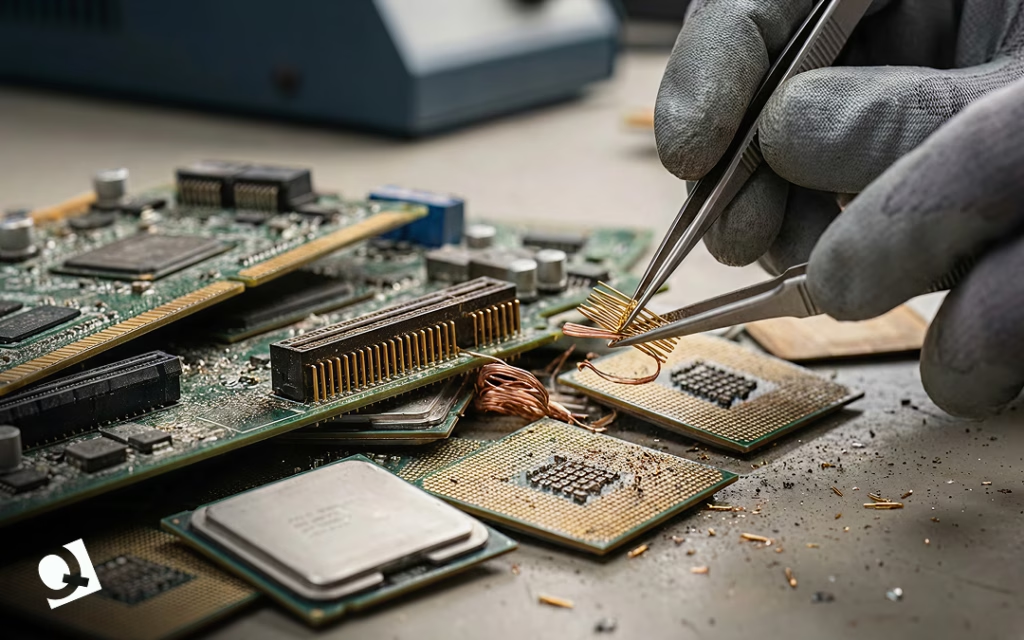
Recycling as a Core Strategy
Do you know who’s leading the change towards sustainability? Microsoft.
In 2024, Microsoft reused and recycled around 90.9% of its servers and components.
Tech giants and businesses understand the importance of incorporating sustainability strategies. Recycling is strategic for businesses in many ways.
During the recycling process, you can assess whether equipment components can be reused. Circularity reduces waste and also avoids the unnecessary investment in new equipment, allowing you to save costs.
As mentioned before, it is also possible to extract precious and valuable material from equipment no longer used, allowing for the recovery of investment. A material that many people look for is copper, which is found in wires.
The hidden factor that no one mentions is the competitive advantage of recycling.
Companies frequently have to comply with regulations on data handling and the safe disposal of waste to protect the environment.
By embracing recycling measures, businesses avoid fines and have the opportunity to position themselves as sustainability leaders, a key differentiator today. Think of audiences that value eco-friendly practices before buying a product.
Sustainability as a business strategy is beneficial to gain an advantage over competitors, comply with regulations on data and e-waste disposal, reduce the environmental footprint, and recover value.
Embracing sustainable practices like recycling is seen as a “trend”, but we take it seriously. Our certifications are part of our commitment to protecting the environment while providing services.
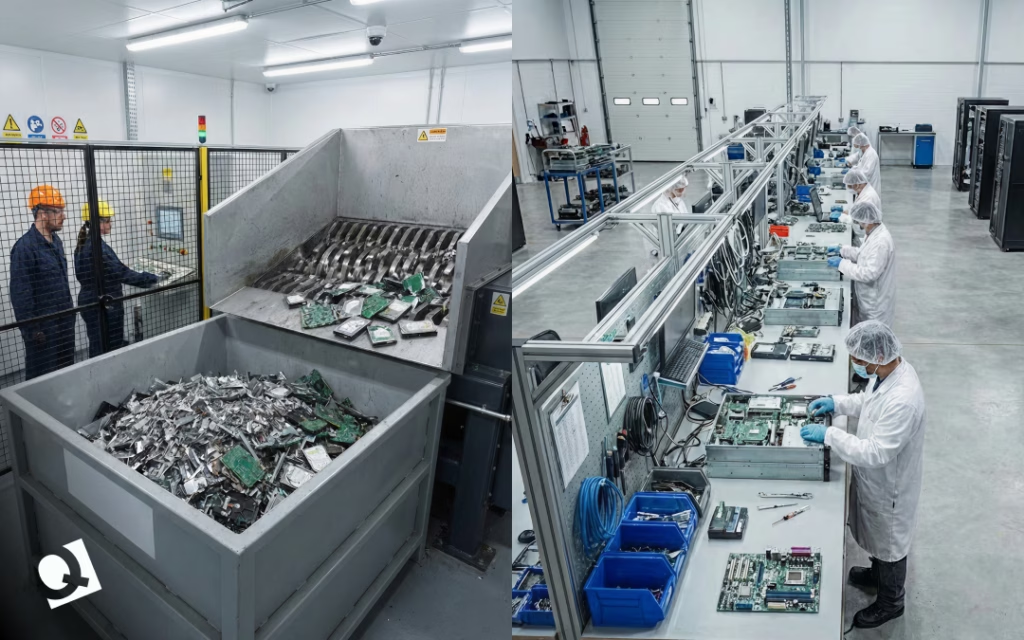
FAQs (Frequently Asked Questions) on Data Center Recycling
- What is data center equipment recycling?
Recycling data center equipment means identifying, managing, restoring, repurposing, and, in some cases, reselling equipment from data centers that still have value, even though they are no longer useful at their current location. Recycling practices range from reusing or repairing equipment to extracting its components and selling them.
- What items can be recycled from a data center?
Some pieces of equipment that can be recycled include routers, switches, power units, racks, wires, CRAC units, batteries and cooling components.
- What are the consequences of an incorrect disposal of data center equipment?
The incorrect disposal of data center equipment has several consequences. First of all, it adds up to the tonnes of waste already generated. Second, it can cause data security breaches from improperly disposed servers containing sensitive information, leading to fines and lawsuits, and harming your company’s reputation. Third, it affects the environment by allowing the release of toxic materials and preventing the repurposing of the equipment.
Quantum: Ready to Recycle With You
Many companies see decommissioning processes as separate from recycling.
At Quantum, we are committed to safeguarding the environment, and data center equipment recycling plays a key role in reducing the impact of data center waste on our planet.
Recycling is an integral part of our data center decommissioning services, because we understand that dismantling your data center is more than erasing your Search History and shutting down some servers.
Responsible elimination of equipment and sustainable practices for data centers are part of our core values.
If you are ready to recycle your data center equipment, contact us today and let us be part of your strategy towards sustainability.
by Brian Dordevic | Jan 13, 2026 | Blog
If you’ve seen the TV show Silicon Valley, you might recall how servers are treated almost like sacred objects. Characters speak in hushed tones around racks of blinking lights. When someone trips over a cable, it seems like a disaster. The show makes
data centers seem mysterious and high-stakes, where a single mistake could bring down an entire company.
That’s an exaggeration, of course, but there’s some truth to it.
Every app, website, video call, cloud file, and AI tool we use relies on a physical space full of hardworking equipment. Data centers aren’t just abstract ideas. They’re real rooms, buildings, and even campuses packed with machines that need to run all the time, stay cool, stay secure, and remain reliable.
You don’t need an engineering degree to understand
data center equipment. It just helps to break things down into simple, practical parts. Let’s get started.
The Quiet Backbone of the Internet
Most people think of software when they think about technology, apps, platforms, dashboards, and interfaces. But software can’t work by itself. It needs hardware to run, store data, process requests, and move information between systems.
That’s where data center equipment comes in.
At its core, a data center is a controlled environment designed to house and protect computing equipment. The goal is simple: keep systems running 24/7 without interruption. Everything inside a data center supports that goal, directly or indirectly.
Some equipment thinks. Some store information. Some keep everything powered. Some keep everything cool. And some exist purely to prevent chaos.
Servers: Where the Work Happens
Servers are the stars of the show, and for good reason. They are the machines that actually run applications, process data, and respond to user requests.
In a TV show, a server might look like a magical black box. In real life, it’s a specialized computer built for reliability and performance. Servers are designed to operate continuously, often for years, without being shut down.
They usually live in metal racks, stacked neatly one on top of the other.
Each server has processors, memory, storage, and network connections, similar to a personal
computer, but scaled up and hardened for continuous operation.
Different servers serve different purposes. Some handle databases. Others manage web traffic. Some run virtual machines. Others are optimized for high-performance computing or AI workloads.
What matters most is consistency. A server doesn’t only need to look impressive. It also needs to work every single time.
Storage Equipment: Where the Data Lives
If servers are the brain, storage is the memory.
Storage equipment is where data actually lives when it’s not actively being processed. This includes customer records, application data, backups, videos, images, logs, and everything else organizations can’t afford to lose.
Modern data centers use a mix of storage types. Some systems prioritize speed, using solid-state drives to deliver fast access. Others prioritize capacity, using larger disks to store massive volumes of data at a lower cost.
Redundancy is critical here. Data is rarely stored in just one place. Copies are spread across multiple drives, systems, or even locations so that if something fails, the data remains accessible.
On TV, losing data often happens instantly and dramatically. In reality, data loss is usually slow, preventable, and tied to poor planning or neglected equipment.
Networking Equipment: The Digital Highway
Servers and storage are useless if they can’t communicate. Nequipment enables data to move within the data center and out to the world. This includes switches, routers, firewalls, and cabling systems.
The switches connect devices within the data center, making sure traffic flows efficiently between servers and storage systems. Routers manage traffic between networks, directing data to the right destinations. Firewalls control access and help protect systems from unauthorized activity.
Cabling may not look exciting, but it’s one of the most critical components. Poor cable management leads to airflow problems, maintenance headaches, and human error. In real data centers, cables are labeled, routed, and secured with obsessive care.
This is one area where the Silicon Valley panic scenes feel familiar. One unplugged cable can cause real problems, even if it doesn’t bring the internet crashing down in slow motion.
Power Equipment: Keeping the Lights On
Data centers are power-hungry environments. Servers need electricity, but they also need stable, clean power.
Power equipment includes uninterruptible power supplies (UPS), power distribution units (PDUs), backup generators, and monitoring systems. Their job is to make sure that power interruptions do not interrupt operations.
If the main power source fails, UPS systems provide immediate backup power, buying time for generators to start. Generators then supply electricity for extended outages. This is not optional equipment. Even a few seconds of downtime can cause data corruption, service outages, or financial loss.
In reality, power planning is one of the most complex parts of data center design. It’s also one of the least visible when everything is working properly.
Cooling Equipment: Fighting Heat Every Second
Servers generate heat. Lots of it.
Cooling equipment exists to remove that heat and keep temperatures within safe operating ranges. This includes air-conditioning units, chillers, fans, liquid-cooling systems, and airflow-management tools.
Modern data centers are designed around airflow. Cold air is delivered where it’s needed most. Hot air is removed efficiently and kept from mixing with cool air.
When cooling fails, problems escalate quickly. Overheating can cause automatic shutdowns, hardware damage, and a shortened equipment lifespan.
This is one area where reality is far less dramatic than TV, but far more unforgiving. There’s no heroic fix at the last second. Cooling either works, or it doesn’t.
Racks and Physical Infrastructure: The Real Heroes
Racks, cabinets, and containment systems don’t get much attention, but they are essential. They hold servers and ensure proper airflow.
The cabinets protect the equipment from dust and accidents. Raised floors or overhead systems help route cables and cooling efficiently.
Good infrastructure makes maintenance easier and safer. Poor infrastructure makes simple tasks risky.
In many real data centers, the difference between smooth operations and constant problems comes down to how well this “boring” equipment was planned.
Monitoring and Management Tools
Modern data centers are heavily monitored environments.
Sensors track temperature, humidity, power usage, airflow, and equipment health. Data Management software alerts teams when something is out of range, long before a human would notice.
This proactive approach is what prevents small issues from becoming outages. It’s also why real data centers are usually calm places, not the high-stress chaos we see on TV.
Most of the work happens quietly, in dashboards and alerts, not frantic conversations.
Security Equipment: Physical and Digital
Data center security isn’t handled in just one way. It’s built in layers, with each layer backing up the next.
It starts with physical security. Access to a data center is tightly controlled. Cameras monitor activity, entry points are locked down, and sensitive areas are often protected by cages or restricted zones. In some facilities, biometric systems add another level of control, making sure only authorized people can get near critical equipment.
Then there’s the digital side. Security software constantly watches network traffic, looking for anything unusual. It blocks known threats, flags suspicious behavior, and enforces rules that keep systems from being exposed.
All of this exists for one simple reason: trust. Customers trust that their data will be handled safely. The equipment inside a data center plays a major role in protecting that trust every single day.
The Lifecycle of Data Center Equipment
One thing you rarely see in movies or TV shows is what happens when data center equipment reaches the end of the road.
None of this hardware lasts forever. Servers slow down over time. Storage systems fill up. Power equipment becomes less efficient. Cooling technology improves, leaving older systems behind.
At some point, equipment needs to be replaced, shut down, or fully decommissioned. That process takes planning. Data has to be moved carefully. Drives must be securely wiped or destroyed. Old hardware needs to be recycled or disposed of responsibly.
When organizations ignore this lifecycle, problems tend to pile up. Costs rise, risks increase, and day-to-day operations become harder than they need to be.
Data Center Equipment Is The Reason
AI, cloud computing, and digital transformation get a lot of attention, but all depend on the physical hardware that runs in the background.
The next time a TV show highlights a chaotic server room, keep in mind that the real effort happens in preparation, reliable backups, and systems quietly operating as intended.
It’s the data center equipment that makes our technology dependable, and always on; the steady background hum is what powers the digital world.
Next time you’re using your favorite app or video calling a friend, take a moment to appreciate the incredible data center equipment working tirelessly behind the scenes to make it all possible!
by Brian Dordevic | Jan 13, 2026 | Blog, Data Center Decommissioning
When data center disasters show up in movies, they all look the same.
Everything feels controlled, almost sterile. Then someone notices a warning on a screen. A moment later, smoke crept along the ceiling. Alarms go off. People start running. The servers are overheating, the facility is failing, and chaos takes over.
It makes for a great scene.
In real data centers, nothing explodes or catches fire. There is no dramatic moment when everyone realizes something is wrong. Instead, problems develop quietly, which makes them even more dangerous.
Temperatures rise slowly. Cooling units run longer than usual. A warning appears, then clears. Everything seems fine, so everyone moves on.
Until the alarms finally sound, the problem has already been building for days or weeks.
The Problem Usually Starts Long Before the Outage
When a data center experiences downtime, the investigation almost always starts in the same place: Servers, power, and network equipment.
Cooling is often treated as a secondary system, something that either works or doesn’t. If the cooling is running, it is assumed to be fine.
In practice, many cooling failures do not happen suddenly; they start during maintenance.
An upgrade, a routine repair, component replacement, or scheduled service window can be eventful. Once the system is back online and dashboards turn green, it’s easy to assume that everything went smoothly.
Even a small issue during refrigerant handling might have occurred, one that remains hidden until the right conditions reveal the problem.
Why Refrigerant Handling Matters in Data Centers
Every time a cooling system is serviced, repaired, upgraded, or decommissioned, refrigerant must be removed from the system. This step is unavoidable.
A
refrigerant recovery machine enables the safe extraction of refrigerant, stores it in certified recovery cylinders, and prevents its release into the environment or contamination of the system.
When the process is handled correctly, the cooling system can be returned to service as designed. If rushed or done improperly, long-term risks are introduced.
What Goes Wrong Without Proper Refrigerant Recovery
Improper refrigerant handling does not always cause immediate failure. That is what makes it dangerous.
Common issues include:
- Loss of refrigerant during maintenance.
- Moisture is entering closed refrigerant loops.
- Air trapped inside system lines.
- Incorrect refrigerant charge during restart.
Each of these issues places stress on compressors and reduces cooling efficiency. The system may appear to function normally at first, especially under light loads.
As demand increases, the margin disappears.
The False Confidence of a “Clean” Restart
After maintenance, cooling systems often restart without any apparent issues: dashboards return to green, temperatures stabilize, and teams move on.
All of this creates a false sense of confidence.
Cooling systems typically fail under load, not during idle conditions. A traffic spike, a backup, a software deployment, or a seasonal temperature increase can push a compromised system beyond its limits.
When that happens, thermal alarms escalate to that point fast enough that the opportunity for prevention has passed.
Why the Server Room Is Rarely the Real Starting Point
When servers overheat, everything downstream feels like an IT problem. Systems throttle back. Applications slow down or drop. Virtual machines scramble to move. Customers notice almost immediately.
From the outside, it appears to be a server failure. Inside the facility, the story is often very different.
In many cases, the real issue stems from the cooling work done days or even weeks earlier. A small mistake during maintenance. Refrigerant handling seemed routine at the time. Nothing dramatic enough to raise concerns right away.
Cooling failures tend to be delayed failures. This means it is not immediately apparent, and that delay makes them harder to diagnose, harder to explain, and far more expensive to fix once they surface.
By the time the servers react, the real damage has already been done.
Refrigerant Recovery Machines as a Reliability Tool
In data center operations, reliability depends on consistency.
Processes must be repeatable, verifiable, and documented. Refrigerant recovery machines support these processes by standardizing how refrigerant is removed and stored during maintenance, ensuring:
- Clean refrigerant extraction without contamination.
- Accurate refrigerant preservation for recharging.
- Stable system pressure during restart.
- Faster and more predictable recovery times.
Data center reliability is defined by execution.
Every maintenance task is an opportunity to protect system stability or introduce risk. Refrigerant recovery is often treated as a background step, but it directly affects cooling performance,
equipment lifespan, and resilience. Ignoring it does not remove the risk. It simply delays the appearance of the consequences.
Why This Matters More in Modern Data Centers
Modern data centers operate with higher rack densities and tighter thermal thresholds. There is less tolerance for inefficiency.
As cooling architectures become more complex, even small refrigerant-related issues can have amplified effects. What was manageable in older facilities becomes unacceptable in high-density environments.
This makes refrigerant recovery machines a critical part of modern data center infrastructure management.
Downtime Prevention Starts Before the Alarms
In movies, data center failures are dramatic and immediate. In reality, they are quiet and gradual.
The most damaging outages often begin long before anyone notices a problem.
They begin during routine maintenance. During system restarts. During refrigerant handling, which is often overlooked.
Downtime prevention does not start in the server room.
It starts in the cooling system.
At Quantum Technology, cooling infrastructure is treated as mission-critical, not background equipment.
Our data center services focus on:
- Reliable cooling system maintenance and modernization.
- Proper refrigerant recovery and handling practices.
- Risk reduction during upgrades and decommissioning.
- Protecting uptime through disciplined infrastructure processes.
Whether you are maintaining existing systems, upgrading cooling infrastructure, or planning a data center decommissioning, the details matter.
Quiet failures are still failures.
by Brian Dordevic | Jan 13, 2026 | Blog
Decommissioning a data center is not as simple as turning off the lights and unplugging the servers. It is a detailed process that handles data security, compliance, finances, operations, and people. Whether an organization is moving to the cloud, consolidating locations, or retiring aging infrastructure, the risks of getting it wrong are real.
This is where a data center decommissioning checklist becomes essential.
Instead of relying on your memory or scattered documentation, a checklist provides the team a clear path that helps avoid missed steps, protect sensitive data, and close projects with confidence.
This guide breaks down what data center decommissioning really involves, why a checklist matters, and how to use one in a practical, human way, not just as a technical exercise.
What Data Center Decommissioning Really Means
Data center decommissioning is the structured retirement of systems, hardware, applications, and facilities that are no longer needed or in use.
It can involve an entire data center or just specific components, such as servers, storage devices, or networking equipment.
Organizations typically decommission data centers when they migrate workloads to the cloud, consolidate facilities, upgrade outdated hardware, or even reduce operating costs. In many cases, the decision is driven by business strategy rather than technology alone.
Because data centers support critical services and store sensitive information, decommissioning must be approached carefully. One overlooked system or forgotten access point can lead to security gaps, compliance issues, or unexpected downtime.
Why a Data Center Decommissioning Checklist Is So Important
A data center decommissioning checklist turns a complex shutdown into a controlled process. It helps teams slow down, follow the correct order, and document each step along the way.
When you skip the checklist, you run into issues down the line: leftover data on old drives, lingering access permissions, or vendors that are still charging for services no one is actually using, which can become a headache.
Having a checklist in place helps us avoid these problems and ensures that everyone is on the same page.
It’s all about reducing risks and keeping everything running smoothly.
Just as importantly, it creates an audit trail. When regulators, auditors, or leadership ask how data was handled, the answers are already documented.
Data Center Decommissioning Checklist: Step-by-Step Overview
A strong data center decommissioning checklist focuses on: planning first, execution second, and verification at the end. Below is a practical framework that reflects how decommissioning actually happens in the real world.
Complete Data Center Decommissioning Checklist
Planning and Preparation
-
Be clear about what is shutting down and what is staying active.
-
List every server, system, and application involved.
-
Write down where data goes and who owns it.
-
Check for dependencies so nothing breaks unexpectedly.
-
Assign one clear person in charge for each step.
-
Set realistic dates and let people know in advance.
Compliance, Risk and Governance
-
Confirm laws, contracts, and policies apply.
-
Recognize all data that must be kept and for how long.
-
Flag areas where mistakes could cause outages or exposure.
-
Get written approvals before moving forward.
Data Backup and Migration
-
Back up all important data before touching or doing anything.
-
Test backups to make sure they actually work.
-
Move the required data to its new location.
-
Confirm users can access the data after migration.
Application and Service Decommissioning
-
Give users advance notice of shutdowns.
-
Turn off applications in the right order.
-
Shut down virtual machines and background jobs.
-
Remove integrations and automated connections.
-
Update DNS and traffic routing.
Data Sanitization and Destruction
-
Securely wipe drives using approved methods.
-
Destroy the encryption keys if they are no longer needed.
-
Physically destroy drives when required.
-
Keep records of who handled the data and when.
-
Collect destruction certificates.
Hardware and Asset Removal
-
Power down equipment carefully.
-
Tag and track every piece of hardware.
-
Decide what will be reused, recycled, or sold.
-
Use certified vendors for electronic waste.
Network and Security Cleanup
-
Remove user and admin access.
-
Delete firewall rules and VPN connections.
-
Shut off all monitoring linked to retired systems.
-
Double-check that nothing is still reachable.
Facilities and Infrastructure Closure
-
Shut down power and cooling systems.
-
Remove racks, cables, and flooring if required.
-
Return the leased equipment.
-
Update building access permissions.
Financial and Contract Closure
-
Cancel any licenses and vendor contracts, and confirm billing has stopped.
-
Update asset and accounting records.
Documentation and Final Audit
-
Save configurations and diagrams.
-
Store compliance and destruction paperwork.
-
Perform a final check that everything is complete.
-
Get formal sign-off.
Next, it is essential to conduct a comprehensive post-decommissioning review to identify lessons learned and areas for improvement in future projects.
This review should include all stakeholders to ensure that the decommissioning process was thorough, compliant, and met organizational standards. Finally, maintaining detailed records of the entire process will facilitate audits, support future planning, and ensure ongoing regulatory compliance.
Using a Data Center Decommissioning Checklist Pays Off
A structured data center decommissioning checklist helps organizations avoid any last-minute surprises and long-term risk.
The checklist ensures data is handled responsibly, systems are fully retired, and nothing critical is left behind.
More than anything, a checklist brings clarity. Teams know what has been done, what still needs attention, and when the project is truly finished.
When decommissioning is handled right, it becomes a clean transition rather than a lingering source of risk.
A data center may be shutting down, but the organization moves forward stronger, more secure, and better prepared for what comes next.
Decommission with confidence.
Decommissioning a data center is undeniably complex, but with the right checklist, you can simplify the process and enhance overall security. This structured guidance not only protects your organization but also positions you for future success.
It’s time to take proactive steps. Rally your team, consult the checklist, and embark on your data center decommissioning project with confidence. For those seeking further assistance or resources, don’t hesitate to reach out for expert support.

by Ivan | Oct 30, 2024 | Blog
Laboratory decommissioning is a critical process, especially when laboratories undergo upgrades or relocations. Moving or upgrading a laboratory without a decommissioning plan can lead to safety hazards, regulatory complications, and unexpected costs. This guide outlines all key considerations for safe laboratory decommissioning, ensuring compliance, safety, and cost efficiency.
Understanding Laboratory Decommissioning
Decommissioning a laboratory involves closing down or preparing a facility for its next use, often focusing on safety, regulatory compliance, and environmental responsibility. Decommissioning is a complex process requiring coordinated efforts between lab managers, safety officers, and decommissioning specialists.
Reasons for Decommissioning a Laboratory
Laboratory decommissioning becomes necessary for various reasons, including lab upgrades, relocation, or facility closure. Each scenario brings unique challenges and priorities. For instance, decommissioning for relocation might prioritize safe equipment transfer, while closure may focus on full decontamination.
Planning for Laboratory Decommissioning
An effective decommissioning plan should include a step-by-step approach with a clear timeline. Key steps in planning include a risk assessment, inventory management, regulatory compliance checks, and coordination with experts.
Risk Assessment and Safety Protocols
Risk assessment involves identifying potential hazards like chemical exposure, biological contaminants, or radiation sources. Implementing safety protocols in advance helps protect staff and ensures that the decommissioning process follows industry standards.
Inventory Management and Disposal
Inventorying laboratory assets is crucial. This involves listing and categorizing all equipment, chemicals, and biological specimens. Proper disposal or relocation plans should be set for each item, particularly for hazardous materials, which require special handling.
Regulatory Compliance and Documentation
Decommissioning often requires adherence to federal, state, and local guidelines. Documenting each step and obtaining necessary permits help ensure compliance, avoiding fines and legal complications.
Environmental Impact and Sustainability
Decommissioning presents an opportunity to minimize environmental impact. This can include responsibly disposing of hazardous materials, recycling equipment, and seeking sustainable disposal options.
Hazardous Material Handling
Laboratories may contain hazardous materials such as toxic chemicals, biological agents, or radioactive materials. These must be handled by trained professionals who understand the risks and required disposal methods.
Decontamination and Cleaning
A comprehensive decontamination process involves cleaning surfaces, equipment, and containment areas. Thorough cleaning reduces contamination risk and prepares the lab for new occupants or equipment.
Equipment Disassembly and Removal
Equipment disassembly is another essential step, especially for sensitive or hazardous apparatus. This requires careful planning and professional expertise to avoid damage or contamination risks.
Transportation Logistics for Laboratory Relocation
Laboratory relocation often involves transporting delicate and valuable equipment. Planning logistics, including transportation modes, temperature control, and special handling, is essential to protect these assets.
Partnering with Decommissioning Experts
Experienced decommissioning partners bring expertise in regulatory compliance, equipment handling, and waste disposal, making them valuable collaborators. When choosing a partner, consider experience, safety certifications, and knowledge of specific laboratory needs.
Cost Considerations in Laboratory Decommissioning
The decommissioning process can be costly, but effective planning helps manage expenses. Breaking down costs by task—such as waste disposal, equipment relocation, and decontamination—can reveal opportunities for savings, such as through equipment resale or recycling.
Decommissioning Timeline
Typically, decommissioning timelines range from weeks to months, depending on lab size and complexity. A well-structured timeline should include clear milestones for each stage to ensure that processes stay on track and avoid delays.
Common Challenges and Solutions
Decommissioning can present several challenges, from logistical issues to compliance hurdles. Being prepared for these challenges, such as hazardous material handling or delayed permits, helps ensure a smooth process.
Case Studies and Real-World Examples
Several successful laboratory decommissioning projects demonstrate best practices. For example, laboratories that have relocated without incident typically emphasize early planning, a strong focus on regulatory compliance, and teamwork with experienced contractors.
Conclusion
Proper decommissioning is essential when relocating or upgrading a laboratory. By prioritizing safety, compliance, and sustainability, labs can achieve a smooth transition, avoid risks, and prepare facilities for future success.
Frequently Asked Questions
-
Why is laboratory decommissioning important?
Laboratory decommissioning is crucial to prevent environmental hazards, comply with regulations, and ensure safe disposal or transfer of lab assets.
-
What happens to hazardous materials during decommissioning?
Hazardous materials are handled by trained professionals and disposed of or relocated in compliance with environmental and safety standards.
-
How long does a typical laboratory decommissioning process take?
The timeline can vary from several weeks to months, depending on the complexity and size of the laboratory.
-
Can decommissioning help with sustainability goals?
Yes, decommissioning processes can emphasize recycling and eco-friendly disposal, reducing environmental impact.
-
Is it expensive to decommission a laboratory?
While costs can add up, careful planning can help manage expenses, and resale or recycling of equipment may offset some costs.
-
What should I look for in a decommissioning partner?
Look for experience, knowledge of local regulations, safety certifications, and a track record of successful laboratory projects.

by Ivan | Oct 30, 2024 | Blog
In today’s rapidly evolving tech landscape, businesses depend on the agility and reliability of their data centers more than ever. But as technology advances, the demands on these infrastructures change, raising an important question: Is your data center outdated? In this guide, we’ll cover the clear signs of an aging data center and discuss why, how, and when to consider a much-needed upgrade.
Why Upgrading Your Data Center is Essential
Data centers are the beating heart of most businesses, hosting critical data, applications, and infrastructure. However, as they age, outdated data centers can become costly and inefficient, slowing down business operations. Let’s explore some of the compelling reasons why an upgrade can be essential:
- Enhanced Security and Compliance: Cybersecurity threats are continuously evolving, requiring up-to-date defenses.
- Cost Efficiency: Older data centers can be expensive to maintain, while newer technology often uses less power and requires fewer repairs.
- Environmental Sustainability: Newer centers offer energy-efficient systems, reducing both your carbon footprint and operating costs.
Key Signs Your Data Center Needs an Upgrade
Knowing when it’s time for an upgrade isn’t always straightforward. Here are some telltale signs that your data center is reaching the end of its life cycle.
Declining Performance and Frequent Downtime
If you’re experiencing unexpected outages or slow performance, these could be signs of aging hardware. Downtime can lead to productivity loss, frustrated clients, and a negative impact on your brand reputation. Older systems may struggle with increasing workloads and won’t be as responsive as newer technology.
Escalating Maintenance Costs
With older data centers, frequent repairs and part replacements can quickly add up. Not only are these systems harder to maintain, but they can also lead to significant unplanned costs that disrupt your budget. Investing in an upgrade can provide a better return on investment (ROI) over time by reducing these high maintenance costs.
Increasing Security Vulnerabilities
Outdated data centers often lack modern security features, making them vulnerable to cyber threats. Newer data centers are equipped with advanced cybersecurity measures, from firewalls to AI-driven anomaly detection. If your data center lacks these protections, an upgrade is a critical step toward safeguarding sensitive data.
Rising Energy Consumption
Older data centers consume more power due to outdated cooling systems and inefficient equipment. If you notice your energy bills rising without an increase in data processing demands, this could be due to inefficient systems. Upgrading to energy-efficient technology not only cuts costs but also aligns your business with sustainable practices.
Inability to Meet Compliance Standards
Regulatory requirements are continually evolving, and an outdated data center can put your organization at risk of non-compliance. Compliance standards often require secure, resilient, and updated systems to protect user data. Upgrading ensures you meet these critical standards and avoid costly penalties.
Limited Scalability and Flexibility
As your organization grows, so will your data needs. Older systems often lack the flexibility to handle increased workloads, limiting your ability to scale seamlessly. A modern data center, however, offers the adaptability and scalability necessary for future growth, ensuring that your infrastructure can evolve alongside your business.
Outdated Cooling Systems
Efficient cooling is essential to keep data centers operational, as high temperatures can damage equipment. If your cooling systems aren’t keeping up, equipment is more likely to overheat and fail. Advanced cooling systems offer better control and can cut down on energy use.
Key Technologies for Modern Data Centers
If you’ve recognized some of the signs above, you’re likely considering an upgrade. Here are some cutting-edge technologies to consider:
Virtualization and Cloud Integration
Virtualization allows you to create multiple virtual environments on a single physical server, increasing efficiency and reducing costs. Cloud integration further enhances flexibility, enabling scalable storage and processing power without needing additional hardware.
Enhanced Cooling Solutions
Modern cooling solutions, such as liquid cooling and airflow management, improve efficiency and reduce energy costs. These cooling systems are designed to meet the high-performance demands of today’s data centers while saving money.
Cybersecurity and Data Protection Tools
Advanced data centers incorporate the latest in cybersecurity, from AI-powered threat detection to encryption and multi-layered security protocols. Upgrading with these features protects your data and improves compliance.
Automation and AI in Data Management
Automation and artificial intelligence streamline data management, allowing real-time monitoring, anomaly detection, and predictive maintenance. Implementing AI-driven solutions improves operational efficiency and reduces human error.
Green Technologies for Energy Efficiency
Green technology options like energy-efficient servers, optimized lighting, and renewable energy sources can dramatically reduce your data center’s carbon footprint. These solutions also align your organization with global sustainability goals.
Benefits of a Data Center Upgrade
An upgraded data center provides multiple benefits:
- Increased Operational Efficiency: Faster systems reduce downtime, improve processing speeds, and support uninterrupted operations.
- Improved Security and Compliance: With the latest security features, your organization can better handle compliance and protect data.
- Cost Savings: Reduced maintenance and energy costs directly impact your budget.
- Sustainability: Energy-efficient systems reduce your environmental footprint, aligning with eco-conscious values.
Steps to Plan a Data Center Upgrade

Upgrading a data center requires careful planning. Here’s a step-by-step guide to ensure a smooth transition:
- Assessment: Begin with a thorough analysis of your current infrastructure.
- Budget Allocation: Determine a budget based on long-term cost savings.
- Vendor Selection: Choose reputable vendors to provide new equipment and services.
- Implementation Timeline: Plan a timeline to minimize disruptions to operations.
Common Mistakes to Avoid During a Data Center Upgrade
While upgrading, avoid these common mistakes:
- Lack of Planning: Rushing into an upgrade without proper planning can lead to budget overruns.
- Ignoring Security Needs: Security upgrades should be prioritized to protect against cyber threats.
- Overlooking Scalability: Ensure the new data center can grow with your business.
ROI of Upgrading an Outdated Data Center
Investing in an upgrade yields strong returns, including reduced operational costs, improved performance, and lower energy expenses. By enhancing productivity and minimizing downtime, a new data center pays for itself over time.
Case Studies of Successful Data Center Upgrades
Several companies have seen incredible benefits from upgrading their data centers. For example, Company A reduced their energy costs by 30% with new cooling technology, while Company B improved their cybersecurity to comply with new regulations.
Future Trends in Data Center Technology
Looking forward, trends like edge computing, AI-driven automation, and 5G technology are set to shape the future of data centers. Staying informed about these trends can help future-proof your investments.
FAQs
- Why should I upgrade my data center?
- Upgrading increases efficiency, improves security, and can lead to long-term savings.
- What are the first steps in planning a data center upgrade?
- Start with an assessment of current needs, followed by budget planning and vendor selection.
- How does outdated equipment impact energy costs?
- Older equipment typically uses more energy, increasing operational expenses.
- What are green technologies for data centers?
- Energy-efficient servers, renewable power sources, and advanced cooling solutions are examples.
- How often should I consider upgrading my data center?
- Generally, every 5-7 years is a good timeline to consider an upgrade.
- What’s the ROI on a data center upgrade?
- A well-planned upgrade can provide strong returns through reduced costs and improved productivity.